1-Visitor
September 10, 2019
Solved

open Error web with IE Edge

  • September 10, 2019
  • 7 replies
  • 2943 views
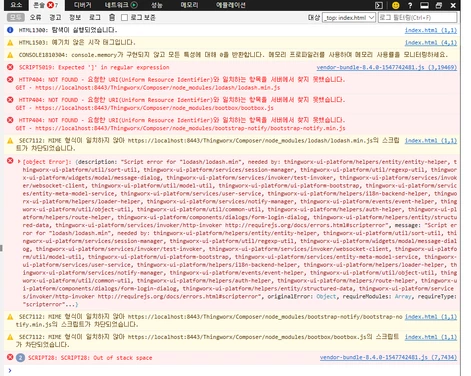
I installed ThingWorx 8.4 and opened the web with IE Edge and it doesn't open. I checked the message with the developer tools and the output was:windows ie 에러.png
 

Best answer by yanchen

Hi,

I‘ve already reproduced your issue in Microsoft Edge 42/44 version in Chinese/Korean system locale, but works fine in English Locale.

This issue was reported to R&D as JIRA TW-50057, and had already been fixed in ThingWorx 8.5.

Here are the solutions for you:

1. Still use Thingworx 8.4 with IE 11/Edge, please change system locale to English (Control Panel>Region>Administrative>Change system locale) and restart workstation.

2. Use Chrome instead for Thingworx 8.4

3. Upgrade to Thingworx 8.5


Thanks,

Steven

7 replies

15-Moonstone
September 10, 2019

Hi,

Is the issue specific with IE Edge?  Google Chrome browser works or not?

Does ApplicationLog.log report other error as well? 

kikky_791-VisitorAuthor
1-Visitor
September 19, 2019

this problem is IE Edge issue, I don't see anything unusual in the Application Log.log

Support
September 10, 2019

Hi @kikky_79.


The screenshot shows an "out of stack space" error.  As stated by @yanchen, you need to check the ..ThingworxStorage\logs\ApplicationLog.log to validate that ThingWorx is actually running.  If not, did you validate the system requirements before starting the installation?  Which installer did you use or was it a manual install?


If installing a trial version, the installation instructions can be found here for Linux and here for Windows.


For a commercial version, the system requirements can be found here.


Regards.


--Sharon

kikky_791-VisitorAuthor
1-Visitor
September 19, 2019

Thank you Sharon

I followed the guide and went through the installation normally.

It works fine in Chrome

Only the web doesn't open normally in IE.

What should I do?

yanchen15-MoonstoneAnswer
15-Moonstone
September 19, 2019

Hi,

I‘ve already reproduced your issue in Microsoft Edge 42/44 version in Chinese/Korean system locale, but works fine in English Locale.

This issue was reported to R&D as JIRA TW-50057, and had already been fixed in ThingWorx 8.5.

Here are the solutions for you:

1. Still use Thingworx 8.4 with IE 11/Edge, please change system locale to English (Control Panel>Region>Administrative>Change system locale) and restart workstation.

2. Use Chrome instead for Thingworx 8.4

3. Upgrade to Thingworx 8.5


Thanks,

Steven
