13-Aquamarine
October 2, 2021
Solved

Persistent infotable not displaying values but has rows

  • October 2, 2021
  • 2 replies
  • 2200 views

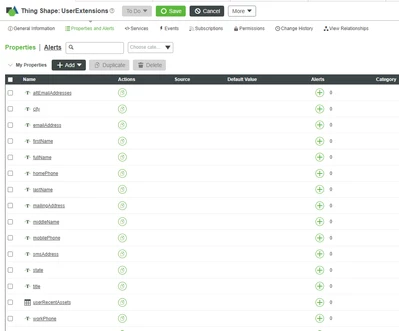
I defined a persistent infotable userRecentAssets in UserExtensions Thing Shape
 

EM_9923519_0-1633136780381.png


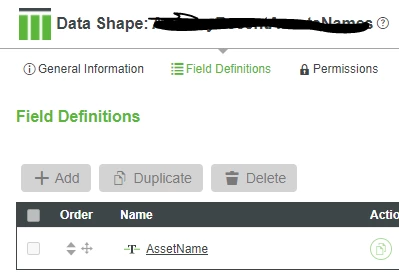
The infotable has a datashape defined like:
 

EM_9923519_1-1633136900985.png

So I have

EM_9923519_3-1633136953759.png

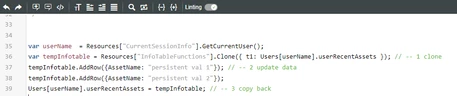
Now inside a service I am getting this infotable for current user like:
 

EM_9923519_4-1633137063907.png

That works but when I want to check if there were any changes to my table I get this
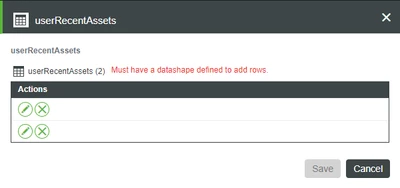
 

EM_9923519_5-1633137126106.png


What am I missing so I can see the values?


Best answer by slangley

Hi @EM_9923519.


From your case, I found that the engineer assisted you with making some code changes for a custom implementation to keep track of all recent user assets utilizing a Data Table for storing the values, and queries to sort the rows based in descending order by using the timestamp field or ID field.


If you agree that this was the solution, please mark this response as the Accepted Solution for the benefit of others with the same issue.


Regards.


--Sharon

2 replies

22-Sapphire I
October 4, 2021

Composer probably isn't set up to see infotable values within user extensions.

So I think you will need to create a service (and maybe associated mashup) to see the values.

13-Aquamarine
October 4, 2021
Ok, could you please give more details?

What do I need to include in the service and in the mashup you commented?
I did this:


[cid:43db39bb-121d-40f2-9fd7-ed928c0767cf]

[cid:2624e643-31d8-4826-a46a-5be32cb25fde]


But if I use a mashup to display a grid populating it with the service, I still see the rows without the values


[cid:f7d796e6-037a-4e1e-aed6-ba9f4cdeb196]
22-Sapphire I
October 4, 2021

You can probably use a service that does something like

var result = Users[NameOfUser].NameOfUserExtension

set the output to InfoTable and then display it in a grid

slangleyCommunity ManagerAnswer
Community Manager
October 20, 2021

Hi @EM_9923519.


From your case, I found that the engineer assisted you with making some code changes for a custom implementation to keep track of all recent user assets utilizing a Data Table for storing the values, and queries to sort the rows based in descending order by using the timestamp field or ID field.


If you agree that this was the solution, please mark this response as the Accepted Solution for the benefit of others with the same issue.


Regards.


--Sharon