

1-Visitor
October 8, 2020
Question

Pivoting and advanced sorting

  • October 8, 2020
  • 2 replies
  • 2507 views

Hello,

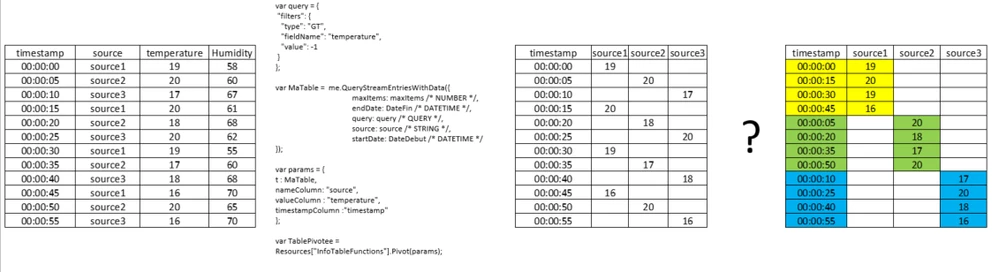
let's say I have a DataStream where I collect temperature and Humidity values from different sensors(=sources). Each sensor send data every 15 seconds, and sensors are asynchronous. 

The aim is to write a service in the DataStream (right table below)in order to have as output an infotable (colored left table below)which will be connected as entry to a timeSeriesChart that draws each temperature curves:
PivottinAndAdvancedSorting.png

I've succeeded in sorting and then pivoting the temperature values (table in the middle) but I want to sort every source column with the corresponding  ascending timestamp (as I want to draw continuous curves, I need continuous rows for a given source without null values in the middle). Are there "advanced" sorting or joining techniques to achieve this? 

2 replies

17-Peridot
October 8, 2020

@xavalv ,


The query object lets you define complex sorts.  Then you can just run the query snippet: 

var params = {
	t: data /* INFOTABLE */,
	query: query /* QUERY */
};

try{
	// result: INFOTABLE
	var result = Resources["InfoTableFunctions"].Query(params);
}
catch(err)
{
 var result = data;
}


See here for info on the query object and complex sorts:

https://support.ptc.com/help/thingworx/platform/r9/en/index.html#page/ThingWorx%2FHelp%2FComposer%2FThings%2FThingServices%2FQueryParameterforQueryServices.html


xavalv1-VisitorAuthor
1-Visitor
October 9, 2020

thank you for you quick feedback. I've already tested sorting features but it gave ma erratic results

Both curves are continuous but the blue one is not coherent from a time perspective (here only with 2 sources):

CaptureCurves.PNG

17-Peridot
October 9, 2020

@xavalv ,


Would you be able to share your query object and the data that is being returned to your chart?  On a related note, if you're using the Advanced Chart Widget, it will force null values to zero.  However, there is an easy way to modify that widget so it will just ignore null values (and then you wouldn't have to worry about the complex sorting).  If you'd like, I can share that with you.


Support
October 16, 2020

Hi @xavalv.


If one of the previous responses answered your question, please mark the appropriate one as the Accepted Solution for the benefit of others with the same question.


Regards.


--Sharon