18-Opal
June 5, 2025
Solved

Print Thingworx Dashboards as PDF

  • June 5, 2025
  • 1 reply
  • 565 views

Hi, 


I followed a couple of Articles from the PTC Knowledge base, and I was not able to get the Dashboard printed as a PDF with the press of a Button. Initially, I tried using an HTML Text Area, but it wouldn't work for interactions like button clicks or the window.print() method.


I am seeking a solution to this issue.

Thingworx version: 9.4 and 9.7

Thanks,
Best answer by pshashipreetham

Hi,


I followed the steps below to print the Dashboard... 

  1. Create a thing and add the below piece of code to it and make the output string:
    result = "<button onclick='window.print();return false;'>Print this page</button>";​
  2. Then, go to the Mashup and add a Value Display widget.
  3. Bind the Service that was created in step 1
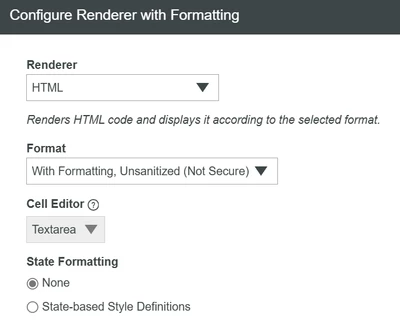
  4. Make the changes to the Render options of the Value Display Widget, as shown below:
    pshashipreetham_0-1749121615602.png


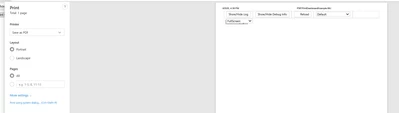
  5. Once we press on the button/value display widget on the Dashboard, it open's up to a Printing options Pop-uppshashipreetham_1-1749121754656.pngpshashipreetham_2-1749121783063.png


Thanks,

1 reply

pshashipreetham18-OpalAuthorAnswer
18-Opal
June 5, 2025

Hi,


I followed the steps below to print the Dashboard... 

  1. Create a thing and add the below piece of code to it and make the output string:
    result = "<button onclick='window.print();return false;'>Print this page</button>";​
  2. Then, go to the Mashup and add a Value Display widget.
  3. Bind the Service that was created in step 1
  4. Make the changes to the Render options of the Value Display Widget, as shown below:
    pshashipreetham_0-1749121615602.png


  5. Once we press on the button/value display widget on the Dashboard, it open's up to a Printing options Pop-uppshashipreetham_1-1749121754656.pngpshashipreetham_2-1749121783063.png


Thanks,