
1-Visitor
Jan 4, 2018 5:50 AM UTC
Question

Problem connecting C SDK to Thingworx composer

Hi,

I am trying the SteamSensor example available in the C SDK folder. But on finally running the exe file I get the following error:
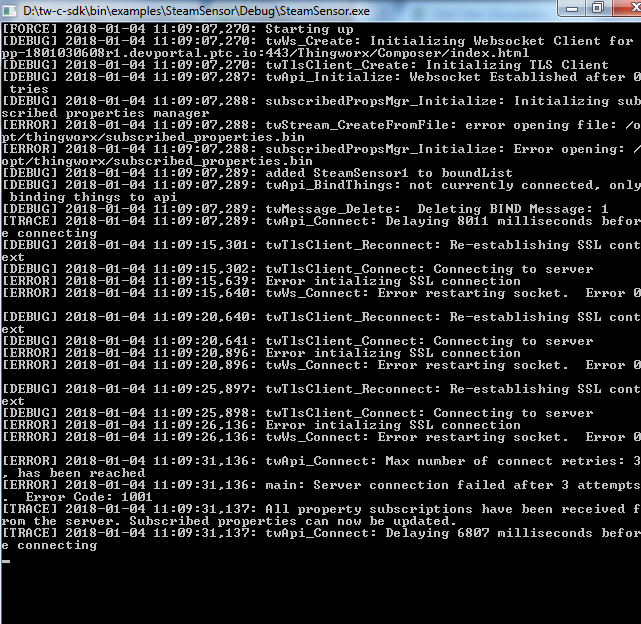
developer portal.png

I am using the 30 day trial online composer whose address is : https://pp-180103xxxxxx.devportal.ptc.io/Thingworx/Composer/index.html

In the main.c file I set:

#define TW_HOST "pp-180103xxxxxx.devportal.ptc.io"

#define TW_APP_KEY "18ecb3d9-xxxx-yyyy-zzzz-ab6b29dc21a8"

What could be the problem? Any help is appreciated

17 replies

5-Regular Member
Jan 4, 2018 7:59 AM UTC

Hi Amit, are you attempting to create secured websocket connection with WSS or insecured with WS?

Translate
agupta-611-VisitorAuthor
1-Visitor
Jan 4, 2018 8:16 AM UTC

Hi Sushant,

How do I check that?

I am not using #define NO_TLS in the main.c file. So port no should be 443. Has it got something to do with that?

I am sorry. I am new to this field and was just following the steps mentioned in the tutorial. (https://developer.thingworx.com/resources/guides/thingworx-c-sdk-setup-guide/connection-test-setup)

Translate
5-Regular Member
Jan 4, 2018 9:15 AM UTC

The error in the command prompt is highlighting issues with creating SSL connection, it seems to be using the 443 which inherently points to the secured websocket. I've not tried this online guide, will check if there's anything that can be configured there, but could you check if there's any possibility that the pc from which you are executing this piece of code is not blocking e.g. firewall or some anti virus this SSL connection to ThingWorx server.

Translate
5-Regular Member
Jan 4, 2018 1:18 PM UTC

Somehow I feel this kind of relates to the network adaptor, (I could be wrong though but it's worth checking) . Could you give this a try How to fix failed Windows sockets initialization? - Microsoft Community it basically points to use the Window's NetShell utility for resetting the see this:  TCP/IP How to reset TCP/IP by using the NetShell utility

Translate
agupta-611-VisitorAuthor
1-Visitor
Jan 5, 2018 11:24 AM UTC

So I tried the above mentioned steps and it doesn't work. Instead it again started giving the previous error: "Error initialising SSL connection" as mentioned in the original post.

I also tried another Windows 7 system with a LAN connection but it still gives the same error.

Translate
1-Visitor
Jan 26, 2018 2:12 PM UTC

Same issue, tried different ports with or without SSL.

With SSL I get:

Error intializing SSL connection

Without SSL I get:

Error trying to connect

I'm using the .NET SDK: SteamSensor example

Would be nice to have a guide for hosted trial platforms.

Translate