
9-Granite
October 19, 2023
Solved

Progress gauge widget border extension upto full aperture
  • October 19, 2023
  • 2 replies
  • 1060 views

Sathya_0-1697728170867.png

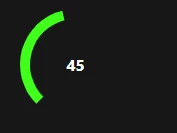
Is there any way to show the remaining gauge value in some other colors or some borders

Ex:

The value in the image is 45

Total value will be 100

Remaining 55 should be shown in other color or from 45 to 100 only gauge border should appear.


Will be of great help, if anyone supports..


Best answer by odukiya

Hello @Sathya 


I could find following posts that might be helpful for your use case here


How-to-create-a-half-progress-gauge-using-the-standard-gauge 

Progress-Gauge-State-formatting 


Thanks

Om

2 replies

odukiya16-PearlAnswer
16-Pearl
October 25, 2023

Hello @Sathya 


I could find following posts that might be helpful for your use case here


How-to-create-a-half-progress-gauge-using-the-standard-gauge 

Progress-Gauge-State-formatting 


Thanks

Om

16-Pearl
October 26, 2023

you can also use two progress gauge one above the other with different z index. One progress gauge will show actual data and another with different color with by default 100 percent data. this will also suffice your requirement.


Thanks,

Suraj Patil