
16-Pearl
March 8, 2023
Solved

Query related to Thingworx AMU - Equipment & Attribute Configuration

  • March 8, 2023
  • 1 reply
  • 879 views

Hi,

We have successfully installed AMU in our local system & also core configuration done as per the steps given Core Functions Confuguration ,by importing json file with some randomly filled spreadsheet values in thingworxapps database and listed equipments in spreadsheet are displayed in the Equipment Configuration Tab.


After that we are facing issues with the next step in advanced settings, in event sub type & the industrial connection selection in drop-downs and also in other process of attribute configuration & asset monitoring.


Kindly provide next following steps of configuration to monitor 1 machine with their parameters & alerts for project exploration purposes.


Please refer attached images FYR.
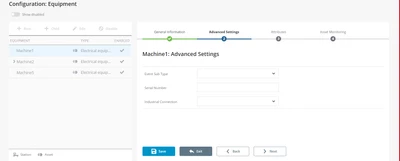
 

Arun_C_0-1678262391893.png


Thanks in Advance


Best answer by PaiChung

From the looks, I think there might be something missing in your configuration?

I would go back through the Core and AMU configuration sections

https://support.ptc.com/help/thingworx_applications_setup/r1.0/en/index.html#page/applications_setup/AMU_Clean_Running_Installer.html#

https://support.ptc.com/help/thingworx_applications_ui/r1.0/en/index.html#page/applications_ui/AMU_Configuration_Equipment.html#


Another possibility might be that when you installed AMU some default values didn't populate for that dropdown.

But my guess is that either it is not matching the equipment type properly and not finding dropdown values, or those values do not exist, 

1 reply

PaiChung22-Sapphire IAnswer
22-Sapphire I
March 13, 2023

From the looks, I think there might be something missing in your configuration?

I would go back through the Core and AMU configuration sections

https://support.ptc.com/help/thingworx_applications_setup/r1.0/en/index.html#page/applications_setup/AMU_Clean_Running_Installer.html#

https://support.ptc.com/help/thingworx_applications_ui/r1.0/en/index.html#page/applications_ui/AMU_Configuration_Equipment.html#


Another possibility might be that when you installed AMU some default values didn't populate for that dropdown.

But my guess is that either it is not matching the equipment type properly and not finding dropdown values, or those values do not exist,