
Solved
Questions about checkboxes
Hello everyone! I've already selected the first box, so how do I get the second box to auto-match based on the things I've selected in the first box?
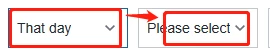

Hello everyone! I've already selected the first box, so how do I get the second box to auto-match based on the things I've selected in the first box?
In that case the selectedItemsChanged event and the Selected Text would be bound to a service called e.g. "GetSubcategories". That service would deliver the right set of values for the second dropbox. The result of the service would be bound to the dropbox.
Enter your E-mail address. We'll send you an e-mail with instructions to reset your password.