

pshashipreetham
18-Opal
18-Opal
October 4, 2022
Solved

Radio Button on the List Items

  • October 4, 2022
  • 2 replies
  • 1708 views

Hi,

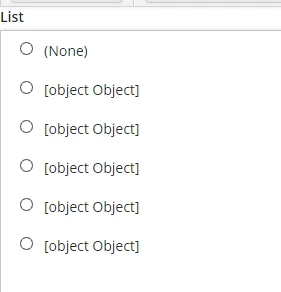
I got the Radio Buttons on the List widget,

Problem: The selected radio Button stays only when we Hover on it. It should be selected after hovering or until the next list item is selected.
Shashi_Preetham_0-1664871093903.png
Used the following CSS:

ptcs-list::part(item-value)::before{
content:url('../Common/thingworx/widgets/dhxgrid/images/radio-unfilled.png');
margin: 10px;
}

ptcs-list::part(item-value):hover::before{
content:url('../Common/thingworx/widgets/dhxgrid/images/radio-filled.png');
margin:10px;
}


Any workarounds over here can be done?

Thanks,

Best answer by pshashipreetham

So,


Every list widget is bounded by a service that has a DataShape. I have created another Field within the Datashape named HTMLField with Basetype HTML and in Service, I have looped as below


for(var x = 0; x < infotable.length; x++)
{
var data = {};
row = infoTable.rows[x];
data.HTMLField = "<html><body><input type = 'radio', id = '"+x+"'></input> <label for = '"+x+"'><b>row.displayField</b></label></body></html>
}


And selected this HTMLField datashape Field as displayField in the ListWidget, which created the Radio Buttons on the Runtime.. and working as expected.

Thanks,

2 replies

22-Sapphire I
October 4, 2022

Are you saying that the selection you make doesn't stay as a solid circle but goes back to a blank circle when you are not hovering over it?

pshashipreetham
18-Opal
18-Opal
October 9, 2022

Hi @PaiChung,

Thanks for the reply. YES, that is Exactly what is happening!

Thanks,

pshashipreetham
18-Opal
pshashipreetham18-OpalAuthorAnswer
18-Opal
October 9, 2022

So,


Every list widget is bounded by a service that has a DataShape. I have created another Field within the Datashape named HTMLField with Basetype HTML and in Service, I have looped as below


for(var x = 0; x < infotable.length; x++)
{
var data = {};
row = infoTable.rows[x];
data.HTMLField = "<html><body><input type = 'radio', id = '"+x+"'></input> <label for = '"+x+"'><b>row.displayField</b></label></body></html>
}


And selected this HTMLField datashape Field as displayField in the ListWidget, which created the Radio Buttons on the Runtime.. and working as expected.

Thanks,