
pshashipreetham
18-Opal
18-Opal
May 4, 2022
Solved

Re: Css for controlling line charts slider height and width

  • May 4, 2022
  • 1 reply
  • 3527 views

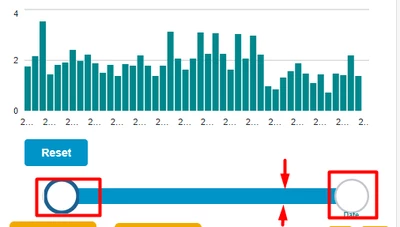
As per this thread - same issue:


Hi @CGinus , 

Facing the same issue, can you help with css ?
psp316r_0-1651665153607.png


Thanks,
Shashi.


Best answer by PEHOWE

@pshashipreetham,
The slider on the Line Chart Widget is not exposed. The CSS will not be able to modify the Slider. 
If this is a feature is desired it will be necessary to file a request for an enhancement. This will need the use case for why this feature is desired. The item will then be reviewed by the Product Managers and considered for inclusion in a future release.

1 reply

12-Amethyst
May 5, 2022

Hi Shashi,

The CSS you probably want to use is this:
ptcs-slider::part(track){
   height: 15px;
   top: calc(50% - 7px);
}

ptcs-slider::part(thumb){
   height: 20px;
   top: calc(50% - 10px);
}


The link shared by VladimirN can help you to find out which parts you can apply CSS to. If you want to know more about parts itself, you can look at this page


Tagging @SK_9989757 in case your problem wasn't solved yet.


pshashipreetham
18-Opal
18-Opal
May 5, 2022

Hi @CGinus ,

The issue didn't get solved yet, @SK_9989757 can you help us on this ?


Thanks,
Shashi

17-Peridot
May 6, 2022

Hello @pshashipreetham

I took a look at this issue in ThingWorx 9.3.2. This seems to be an area where there has been change.


/* Set color of background of the slider area, change the height */
.widget-ptcsslider::part(slider-container) {
   background: yellow;
   height: 8px; 
}
 

/* set color on before side of slider */
.widget-ptcsslider::part(track-before){
   background: green;
   height: 4px;
}


/* set color of track */
.widget-ptcsslider::part(track) {
   background: green;
   height: 4px;
}


The above should adjust the slider height. 


To change the sliders:

/* set the color of the slider by setting fill */
.widget-ptcsslider::part(thumb) {
   fill: lightblue;
   border-width: 7px;
   height: 15px;
   width: 15px;
}

.widget-ptcsslider::part(thumb1) {
   fill: purple;
   border-width: 14px;
   height: 15px;
   width: 15px;
}

.widget-ptcsslider::part(thumb2) {
   fill: orange;
   height: 15px;
   width: 15px;
}


Let me know if this helps. Again, this may not work in all versions.
