
1-Visitor
September 12, 2019
Solved

reset grid column after reducing or increasing the width of the columns

  • September 12, 2019
  • 2 replies
  • 1525 views

Hi,

How to reset to original size of the grid columns after increasing or decreasing the width of the grid in runtime by adjusting their columns?

In runtime, After adjusting the width of the grid it doesn't go back to initial width even after reloading the whole page. How can I resolve this? 


Thanks in advance,

Shalini V.
Best answer by K_Bairagi

 Hi @svisveswaraiya_285988 

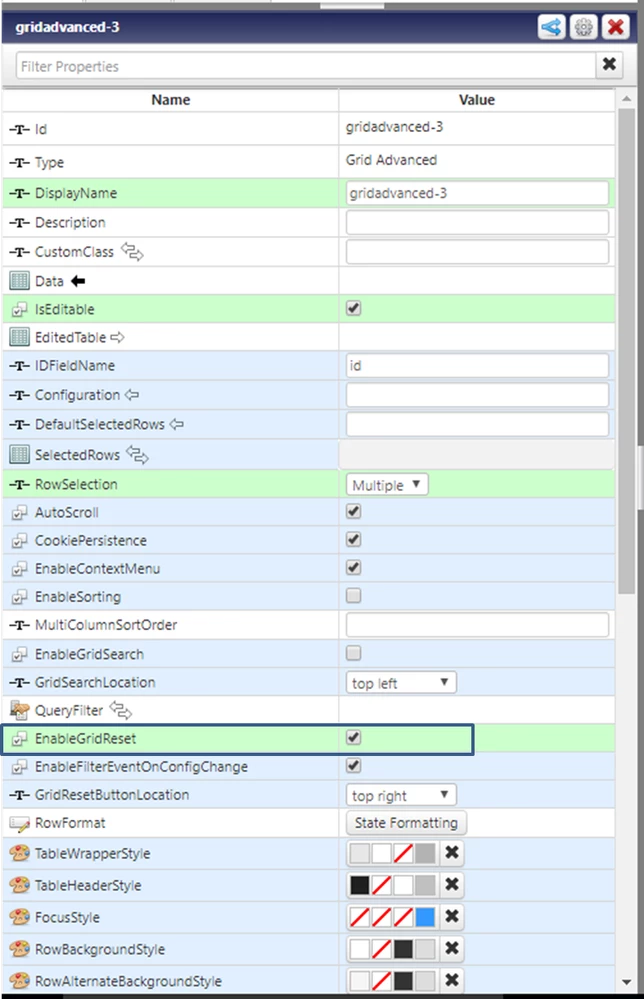
You can use Grid Advanced widget and select Enable Grid Reset option in widget Properties.

I attached image for reference.


Picture3.png


2 replies

17-Peridot
September 12, 2019

@svisveswaraiya_285988 

A similar question was asked about grid sort order. The answer to there question was that the gird did not store the initial sorting information. The same may be true for column width.

Two suggestions where made:

  • Reload the grid data
  • Create a custom grid widget extension that stores and applies the width information.
K_Bairagi1-VisitorAnswer
1-Visitor
September 13, 2019

 Hi @svisveswaraiya_285988 

You can use Grid Advanced widget and select Enable Grid Reset option in widget Properties.

I attached image for reference.


Picture3.png