1-Visitor
June 4, 2018
Solved

Save Message Display on Click of save button

  • June 4, 2018
  • 3 replies
  • 2530 views

Hi,


I wanted to give a popup message on clicking a button.


Instance: I am using a save button which saves the report.Here,

On clicking the save button i wanted to display a pop up which says "saved successfully".

I have written a validation like "not null" values will not get stored, so if anyone tries to save with null values the popup should say "Save Unsucessful"

Please provide some idea. 

How can I make it possible?


Thanks,

V.Shalini.
Best answer by jbester

Good day @svisveswaraiya_285988,


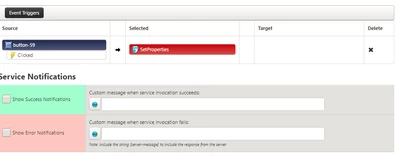
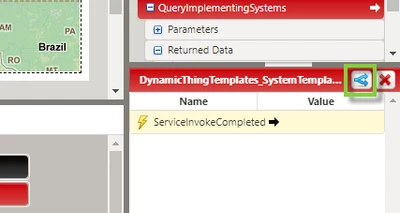
Another possibility you can do is to use the built-in service notifications of the service you fire. This can be found in the services area of the mashup on the right the blue arrows. If the service is completed without an error or not completed it gives a popup message (see below images). I however do not know of a way to display the reason for the error. 


2018-06-05 8-31-50 AM.png


2018-06-05 8-27-32 AM.png

Hope this helps.

Johan Bester

3 replies

5-Regular Member
June 4, 2018

From the validation result you can use a Validator/Expression widget .And if the validation result is passed to Validator widget ,then it can be evaluated on the expression property in widget .Also there are true and false event from Validator widget ,you can use them according to the expression and pass it to the status message widget .There is a service showMessage in status message widget which can populate appropriate message on the mashup.

jbester14-AlexandriteAnswer
14-Alexandrite
June 5, 2018

Good day @svisveswaraiya_285988,


Another possibility you can do is to use the built-in service notifications of the service you fire. This can be found in the services area of the mashup on the right the blue arrows. If the service is completed without an error or not completed it gives a popup message (see below images). I however do not know of a way to display the reason for the error. 


2018-06-05 8-31-50 AM.png


2018-06-05 8-27-32 AM.png

Hope this helps.

Johan Bester

1-Visitor
June 27, 2018

Hi Johan,

Thanks a lot. It helped me and I am able to display it.