12-Amethyst
April 30, 2023
Solved

Scheduler Thing to call a Service

  • April 30, 2023
  • 1 reply
  • 1817 views

Hi,

I am new to ThingWorx platform. Currently I am using ThingWorx version 9.3. It will a great support if I have some sample code on how to implement the below.


Through a Mashup, I am creating a dynamic Scheduler with a JobID, which needs to call the below service which is defined in another thing.


Service (JobID) <<which is defined in another Thing>>
{

... Based on the JobID passed from the Scheduler, I will do some functional logic....

}


If you have any simple and quick solution, Kindly assist.
@Velkumar@Sathishkumar_C@VladimirN 


Best answer by Velkumar

Hi @SKannapiran 


To make it easier I will post each step with a screenshot


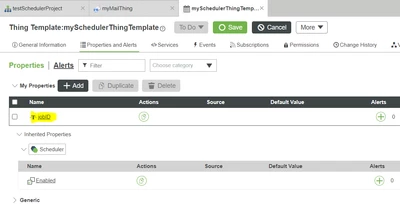
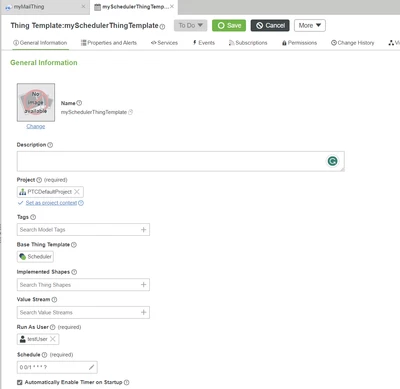
a. mySchedulerThingTemplate

Velkumar_0-1682914086367.png

and property to store jobID

Velkumar_3-1682914392968.png


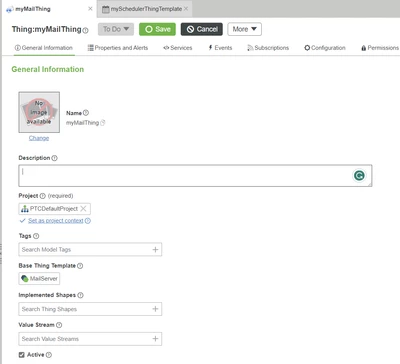
b. email service thing myMailThing

Velkumar_1-1682914140627.png

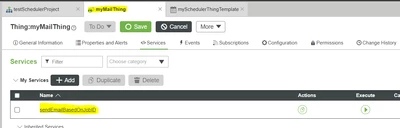
And service to send mail based on Job ID

Velkumar_2-1682914296565.png


Step 1: Create Scheduler ThingTemplate say 'mySchedulerThingTemplate' using Scheduler ThingTemplate ( Refer 'a' )

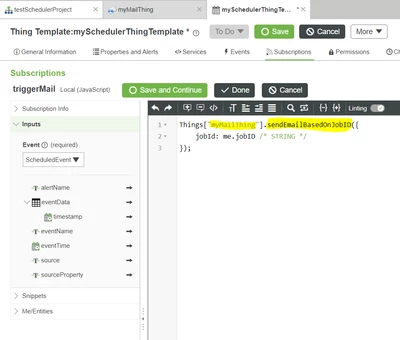
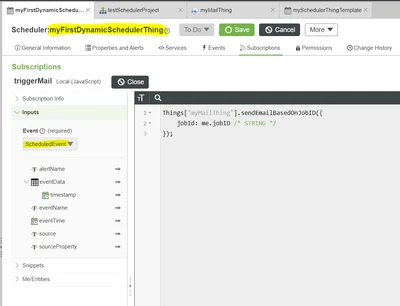
Step 2: In mySchedulerThingTemplate create a service/subscription (based on your use case & jobId will be your input) and call service from "myMailThing" (Note: Make sure subscription is enabled)

Velkumar_4-1682914505778.png

Step 3: Create dynamic Schedulers through Mashup using ThingTemplate "mySchedulerThingTemplate

Velkumar_5-1682914598977.png


So whenever an event is triggered, "myMailThing" service will be called in dynamic schedulers


I have attached entities for your reference


/VR


1 reply

19-Tanzanite
April 30, 2023

Hi @SKannapiran 


Assuming "another Thing" service will be the same for all dynamic schedulers, only functional logic varies based on JobID


Step 1: Create Scheduler ThingTemplate say 'mySchedulerThingTemplate' using Scheduler ThingTemplate

Step 2: In mySchedulerThingTemplate create a service/subscription (based on your use case & jobId will be your input) and call service from "another Thing"

Step 3: Create dynamic Schedulers through Mashup using ThingTemplate "mySchedulerThingTemplate


So whenever an event is triggered "another Thing" service will be called in dynamic schedulers


/VR


12-Amethyst
April 30, 2023

Thanks @Velkumar

For ease of understanding, I have given the steps so far done with properties values.

  • created a Scheduler ThingTemplate = "mySchedulerThingTemplate", which is defined in "Project1" (as stated in Step# 1)
  • created a Thing "TestScheduler_Dynamic"  in "Project1" which will create a dynamic Scheduler (DynamicSchedulerRuntime) along with CRON values through script.
  • In that script, we have metioned thingTemplateName:"mySchedulerThingTemplate".
  • There is an another Thing "Dummy_Thing1" which has a service "EmailService" which will take JobID as a parameter.  
  • In "mySchedulerThingTemplate", a new service (TriggerEmail) is created (as mentioned in your Step# 2. Please note there no script written in that service,)

My understanding, you want me to call the "EmailService" from TriggerEMail service, isnt?

If so, please share the code for it, as I mentioned earlier, I am novice to ThingWorx and my attempts made for this approach are not successful.

Needed code :

  1. A script is needed for the TriggerEMail service which calls EmailService (JobID). Kindly note that I am using ThingWorx version 9.3

Below attempts are failing


var services = TargetThingName.GetServices();  <<GetServices is throwing error>>


targetThing.GetServiceDefinitionByName("TargetServiceName") <<Also throwing error>>


Resources["EntityServices"].GetServices <<Also throwing error>>


Velkumar19-TanzaniteAnswer
19-Tanzanite
May 1, 2023

Hi @SKannapiran 


To make it easier I will post each step with a screenshot


a. mySchedulerThingTemplate

Velkumar_0-1682914086367.png

and property to store jobID

Velkumar_3-1682914392968.png


b. email service thing myMailThing

Velkumar_1-1682914140627.png

And service to send mail based on Job ID

Velkumar_2-1682914296565.png


Step 1: Create Scheduler ThingTemplate say 'mySchedulerThingTemplate' using Scheduler ThingTemplate ( Refer 'a' )

Step 2: In mySchedulerThingTemplate create a service/subscription (based on your use case & jobId will be your input) and call service from "myMailThing" (Note: Make sure subscription is enabled)

Velkumar_4-1682914505778.png

Step 3: Create dynamic Schedulers through Mashup using ThingTemplate "mySchedulerThingTemplate

Velkumar_5-1682914598977.png


So whenever an event is triggered, "myMailThing" service will be called in dynamic schedulers


I have attached entities for your reference


/VR