16-Pearl
February 16, 2021
Solved

Scroll bar Appearing vertically in Container

  • February 16, 2021
  • 1 reply
  • 2011 views

Hi ,

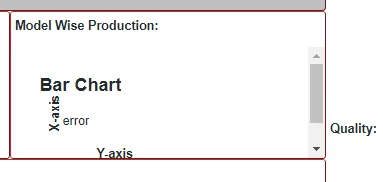
I am using container and in that i added two layouts(Containers) one is responsive with fixed height and another is fully responsive contains bar chart but appearing scroll bar . how to resolve it? please see below snap for ref..

VaibhavShinde_0-1613451126596.png

Thanks

Best answer by TravisPickett

Hi @VaibhavShinde,


Thanks for a copy of the mashup.  When I view your mashup on my screens there was not a scroll bar initially.  However just minor resizing vertically caused the scroll bar to appear.


So the issue is that your bar chart can only be minimized so much ( 160 px ) before the scrolling appears even in a responsive mashup.  This ensures your chart is always some what readable.  To fix the scroll bars you can do this in one of two ways:

  1. Write some custom css to override the minimum height and width of the chart
  2. Adjust your container-6 to have a size range with a minimum around 210 ( minimum for chat 160 + fixed header 38 + X margin and padding).


Thanks,

1 reply

14-Alexandrite
February 16, 2021

Hi @VaibhavShinde 


Can you let me know if there is another widget along with Bar Chart in your container. What type of widget seen with text: Model Wise Production


Will you be able to share an export of your mashup to see the layout structure.


Also, if you are using Thingworx v9.x, you can refer to this HelpCenter link for more details on Configuring Container Scrolling.

16-Pearl
February 22, 2021

Hi @suverma ,

Thanks for the reply, I am using Label widget (Model wise production). and i have attached the exported mashup.

please see and let me know.


Thanks

12-Amethyst
February 22, 2021

Hi @VaibhavShinde,


Thanks for a copy of the mashup.  When I view your mashup on my screens there was not a scroll bar initially.  However just minor resizing vertically caused the scroll bar to appear.


So the issue is that your bar chart can only be minimized so much ( 160 px ) before the scrolling appears even in a responsive mashup.  This ensures your chart is always some what readable.  To fix the scroll bars you can do this in one of two ways:

  1. Write some custom css to override the minimum height and width of the chart
  2. Adjust your container-6 to have a size range with a minimum around 210 ( minimum for chat 160 + fixed header 38 + X margin and padding).


Thanks,