14-Alexandrite
June 21, 2022
Solved

scroll bar trouble in ptcs-grid on iPad

  • June 21, 2022
  • 3 replies
  • 2459 views

Dear Developers,

I'm using ptcs-grid widgets in some mashups which asssumed to be used with iPads.
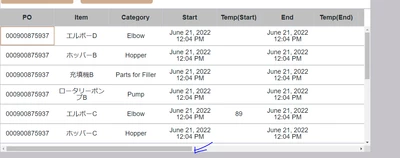
if there are a lot of columns in grids, I expected to be able to see a horizontal scroll bar like the below.
however, we cannot see the scroll bar on all iPads.

Could you let me know how I can fix this trouble ?


I use chrome on both laptop and iPad.

the width of all columns are fixed.


screen shot of my laptop ( display mode : iPad landscape )

YoshihikoN_0-1655783157718.png


Best answer by slangley

Hi @Yoshihiko.N.


Mobile devices don't necessarily handle scrolling the same way you expect to see it on a laptop/desktop.  Often, scrolling is available but no scrollbar appears until you begin to scroll and even then, it really depends on whether the developer chose to display scroll bars or not.  With today's technologies, it's expected that scrolling is available even without scrollbars.


In regard to the 9.2 version, you are using a Preview version of the widget.  ThingWorx 9.3 contains the updated grid widget with corrections to some of the issues discovered in the preview.  We can't say whether moving to Grid Advanced will resolve your issue, since we no nothing about your application.  You will need to test it.  If you do have problems, you will either need to develop your own widget or upgrade.  We just ran a simple test, but scrolling seemed to work fine on 9.3.


If you would like to make some suggestions regarding scrolling, please feel free to post your requests on the ThingWorx Ideas board.  This will allow others to vote for them.


Regards.


--Sharon  

 

3 replies

Support
June 23, 2022

Hi @Yoshihiko.N 


What version of ThingWorx are you running and what versions of iPadOS are your users running?


Even though a scrollbar doesn't appear, does it allow you to scroll?  It's typical on an iPad to be able to swipe without seeing a scrollbar.


Regards.


--Sharon

14-Alexandrite
June 28, 2022

Hi Slangley,

Thank you for your reply.
the followings are the answner.

Thingworx version : 9.2
IOS version : 15.5

Even though a scrollbar doesn't appear, does it allow you to scroll? 
we can scroll vertical direction though cannot scroll horizontal direction.


Thanks and Regards.


Support
June 29, 2022

Hi @Yoshihiko.N


We tested on ThingWorx 9.3.2 and the horizontal scrolling worked.  Did you confirm there are columns outside of the visible area that you can scroll to?


it is possible that the new grid that was introduced in 9.3.0 as a replacement for the Grid Advanced was available in 9.2.x as a beta.  If so, there may have been further changes in 9.3.


Regards.


--Sharon

1-Visitor
July 1, 2022

We are having the same issues with the new widget Grid (Preview) and its scrolling behaviour. Scrolls perfectly fine on laptops but on a tablet absolutely impossible to use. The grid is scrollable but very jumpy and user unfriendly (scrolls 50 rows down if you only scroll a little bit).


The old grid advanced scrolls also fine on tablets. However we cannot use grid advanced since we need the multi-select feature of the new grid (cannot multiselect with a ctrl key on a tablet) and also it will be deprecated soon...


ThingWorx should really look into taking the scrollbars from grid advanced to the new grid preview before deprecating grid advanced. 

14-Alexandrite
July 4, 2022

Hi,


Thank you for your sharing.


if this issue have huge impact on our processes, we can solve this issue by changeing widget from Grid(Preview) to Grid(Advance)?
is it correct ?


slangleyCommunity ManagerAnswer
Support
July 21, 2022

Hi @Yoshihiko.N.


Mobile devices don't necessarily handle scrolling the same way you expect to see it on a laptop/desktop.  Often, scrolling is available but no scrollbar appears until you begin to scroll and even then, it really depends on whether the developer chose to display scroll bars or not.  With today's technologies, it's expected that scrolling is available even without scrollbars.


In regard to the 9.2 version, you are using a Preview version of the widget.  ThingWorx 9.3 contains the updated grid widget with corrections to some of the issues discovered in the preview.  We can't say whether moving to Grid Advanced will resolve your issue, since we no nothing about your application.  You will need to test it.  If you do have problems, you will either need to develop your own widget or upgrade.  We just ran a simple test, but scrolling seemed to work fine on 9.3.


If you would like to make some suggestions regarding scrolling, please feel free to post your requests on the ThingWorx Ideas board.  This will allow others to vote for them.


Regards.


--Sharon