1-Visitor
March 23, 2020
Solved

Search item in list using textbox

  • March 23, 2020
  • 2 replies
  • 1399 views

I have placed textbox on top of list widget.I want to search item using text box in list widget.what serivce to write for searching items on textchanged event

Best answer by raluca_edu

Hi,


I've done this with Text field widget (ptcs-textfield):

1.  I have a list with the names of the Things on the platform using Generic Thing template

2. Create new thing with a service (search_text) that is querying the things

var fieldArray = [];
var txt1=txt+"%";   //txt is the input for the service - actually what you are typing in the widget
var queryField = new Object();
var query = new Object();
if(txt1)
{
queryField.fieldName = "name";
queryField.type = "Like";
queryField.value = txt1;

fieldArray.push(queryField);
}


if( fieldArray.length > 1 )
{

query.filters = new Object();
query.filters.type = "AND";
query.filters.filters = fieldArray;

}
else
{

query.filters = fieldArray[0];
}

var params = {
maxItems: 9999 /* NUMBER */,
query: query /* QUERY */,
source: undefined /* STRING */,
tags: undefined /* TAGS */
};


// result: INFOTABLE dataShape: "RootEntityList"
var result = ThingTemplates["GenericThing"].QueryImplementingThings(params);


I have used 'Like' query with service QueryImplementingThings service.

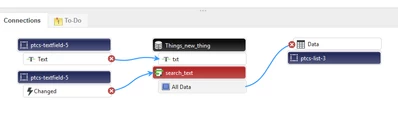
3. In the mashup, create the bindings: txt from search_text bind with Text of textfield, Changed event of textfield bind with search_text service, All Data of search_text bind with  List data.
raluca_edu_0-1584981785915.png


And done, when typing something in the textfield, you will get data in the list; you can adjust the query per your requirement.


* with the widget textbox , you need to hit Enter after typing to get data in the list, so I have used in above example ptcs-textfield widget.


Hope it helps,

Raluca Edu


2 replies

raluca_edu
17-Peridot
March 23, 2020

Hi,


I've done this with Text field widget (ptcs-textfield):

1.  I have a list with the names of the Things on the platform using Generic Thing template

2. Create new thing with a service (search_text) that is querying the things

var fieldArray = [];
var txt1=txt+"%";   //txt is the input for the service - actually what you are typing in the widget
var queryField = new Object();
var query = new Object();
if(txt1)
{
queryField.fieldName = "name";
queryField.type = "Like";
queryField.value = txt1;

fieldArray.push(queryField);
}


if( fieldArray.length > 1 )
{

query.filters = new Object();
query.filters.type = "AND";
query.filters.filters = fieldArray;

}
else
{

query.filters = fieldArray[0];
}

var params = {
maxItems: 9999 /* NUMBER */,
query: query /* QUERY */,
source: undefined /* STRING */,
tags: undefined /* TAGS */
};


// result: INFOTABLE dataShape: "RootEntityList"
var result = ThingTemplates["GenericThing"].QueryImplementingThings(params);


I have used 'Like' query with service QueryImplementingThings service.

3. In the mashup, create the bindings: txt from search_text bind with Text of textfield, Changed event of textfield bind with search_text service, All Data of search_text bind with  List data.

raluca_edu_0-1584981785915.png


And done, when typing something in the textfield, you will get data in the list; you can adjust the query per your requirement.


* with the widget textbox , you need to hit Enter after typing to get data in the list, so I have used in above example ptcs-textfield widget.


Hope it helps,

Raluca Edu



Support
April 3, 2020

Hi @gajapriya.


If the previous response answered your question, please mark it as the Accepted Solution for the benefit of others with the same question.


Regards.


--Sharon