
11-Garnet
June 25, 2019
Solved

Selected drop down value on LED display

  • June 25, 2019
  • 1 reply
  • 2425 views

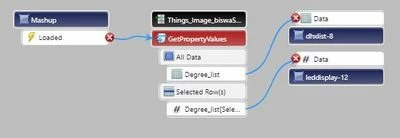
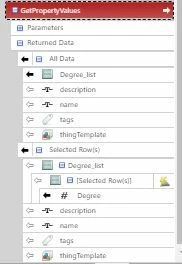
I want to display the selected value from the drop down list on the LED display. I have used the selected item from a List widget, bind the Selected Row(s) from the Service used to populate the List. But still data is not loading in the LED display. How can I get the data to display.
 

Connections.JPGServices.JPG

Best answer by Rajesh_Sayana

Hi Biswa, 


Could you please confirm the base type of the Degrees_list property. From the image it appears to be of base type Infotable. If it is of base type Infotable and you bind it to the list, in order to display values on the UI, you need to set values for DisplayFiled and ValueField properties from the List Widget property window. Now bind the same property you have chosen to display in the list, from the selected rows, to the LED widget. Please refer the attached images for your reference. 


Best regards,

Rajesh.

1 reply

Support
June 25, 2019

Hi @biswa.


What happens if you bind Degrees_list from Selected Rows to the List widget?


Regards.


--Sharon

biswa11-GarnetAuthor
11-Garnet
June 26, 2019

Hi Sharon,


If I bind Degrees_list from Selected Rows to the List widget, no data shows up in the list. It does not show any data. If I bind the same from All Data, then the list comes up with options. 


Thanks and Regards,

Biswa

5-Regular Member
June 26, 2019

Hi Biswa, 


Could you please confirm the base type of the Degrees_list property. From the image it appears to be of base type Infotable. If it is of base type Infotable and you bind it to the list, in order to display values on the UI, you need to set values for DisplayFiled and ValueField properties from the List Widget property window. Now bind the same property you have chosen to display in the list, from the selected rows, to the LED widget. Please refer the attached images for your reference. 


Best regards,

Rajesh.