
1-Visitor
June 27, 2022
Solved

Single Click event trigger on Tree Widget

  • June 27, 2022
  • 2 replies
  • 1736 views

Hello everyone,

I have one Tree widget containing some items for selection. When I double click on any one of the item, a grid is displayed containing a list of devices that are part of that particular selection.

Now I want that this should be possible using single clicked event. But we have only "double clicked" event trigger  available for standard tree widget.
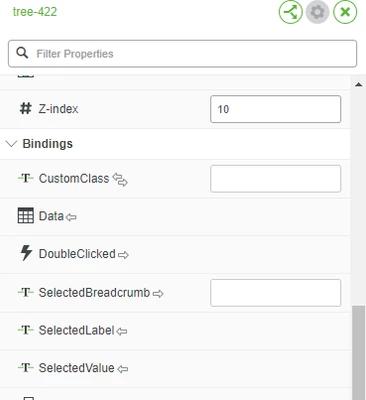
KritikaS_0-1656307714023.png


One of the way to do this is creating a customized Tree widget, having a single click event trigger instead of double click.

But by any way is it possible to find an alternate solution for this that doesn't requires creation of a customized widget?? 


Best answer by slangley

Hi @KritikaS 


You should also have events that originate from the service bound to the tree.  One such event might be SelectedRowChange that will allow you to accomplish your need.


If there's something we're not understanding, please let us know.


Regards.


--Sharon 

2 replies

slangleyCommunity ManagerAnswer
Community Manager
June 29, 2022

Hi @KritikaS 


You should also have events that originate from the service bound to the tree.  One such event might be SelectedRowChange that will allow you to accomplish your need.


If there's something we're not understanding, please let us know.


Regards.


--Sharon 

1-Visitor
May 26, 2025

There is no such event on the Tree widget. I have the same problem


Community Manager
July 22, 2025

Hi @AP_12519601


You didn't indicate the version of ThingWorx you're running, but since you don't have the SelectedRowsChanged event, you can consider these options:


JavaScript Customization: If you have access to JavaScript within your application, you can add a click event listener to the Tree widget. This listener can be programmed to trigger the same action as the double-click event when a single click occurs.


Check for Configuration Options: Review the configuration settings of the Tree widget in your platform. Some versions may have options to modify event triggers or behaviors that could allow for single-click functionality.


Refer to Documentation: For more detailed guidance, consult the official documentation for the Tree widget and Advanced Grids:

If these options do not meet your needs, creating a customized Tree widget may be the only solution to achieve the desired functionality.


Regards.


--Sharon

Community Manager
August 12, 2025

Hi @AP_12519601 


Were you able to find a solution?  Were any of the options provided useful?


Regards.


--Sharon