
1-Visitor
October 9, 2019
Solved

Sorting an infotable in ascending order

  • October 9, 2019
  • 3 replies
  • 7102 views

Hi all, I am trying to sort an infotable in ascending order of a column, in this case the LegReaction column.
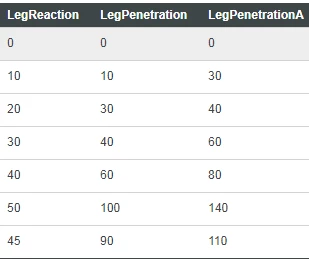
Capture.PNG

As shown in the infotable above, I want to put the value of LegReaction (45) between values 40 and 50 without manually modifying the infotable but by JavaScript programming. Any help is greatly appreciated!

Best answer by kahmeng96

Hi all, I have found the solution by tinkering with the sort function

data.sort(function(a, b){return a.LegReaction-b.LegReaction});

3 replies

17-Peridot
October 9, 2019

Hi,


You should follow algorithm to insert object in a sorted array: https://www.geeksforgeeks.org/search-insert-and-delete-in-a-sorted-array/

Sorry, I don't have the code but this is the idea, implement the inserting operation in infotable via a service following the above algorithm.


Workaround: add a row in infotable, doesn't matter the position and then use the Sort function: 

Resources["InfoTableFunctions"].Sort(params)


Hope it helps,

Raluca Edu

kahmeng961-VisitorAuthor
1-Visitor
October 9, 2019

Thanks for the advice, @raluca_edu! However, I found an easier solution which is the I accepted as the solution to my question.

17-Peridot
October 9, 2019

You welcome! I saw your post after. Good luck!

kahmeng961-VisitorAuthorAnswer
1-Visitor
October 9, 2019

Hi all, I have found the solution by tinkering with the sort function

data.sort(function(a, b){return a.LegReaction-b.LegReaction});

12-Amethyst
October 22, 2021

Hi kahmeng96,


I know you already have a solution, but this might be an alternative...


//The code below sorts an infotable by the specified column.

var result = Resources["InfoTableFunctions"].Sort( {

     sortColumn: "LegReaction", t: myInfoTable, ascending: true

} );