
pshashipreetham
18-Opal
18-Opal
December 30, 2021
Solved

Spacing Issue in Line Chart

  • December 30, 2021
  • 2 replies
  • 2433 views

Placed an Line Chart on the Mashuip, But there is lot of spacing issue on the Chart, by which Dashboard Width and height needed to be increased. How can the spaces can be removed ?
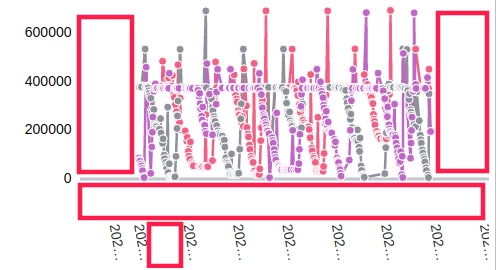
DeepinScreenshot_select-area_20211230165459.png
@c_lowy @slangley @VladimirN @CarlesColl 

Thanks,
Shashi

Best answer by pshashipreetham

So,

This issue got fixed by changing the padding in the StyleProperties, Base-->Chart Layout

Thanks,

2 replies

14-Alexandrite
December 30, 2021

Hello @pshashipreetham ,


The spacing that you are seeing comes into play if the following fields are set to the default value of "Auto":


  • XAxisMinimumValues
  • XAxisMaximumValues
  • YAxisMinumumValues
  • YAxisMaximumValues


You could try setting these properties to values that are closer or equal to the smallest/largest values in your data set as appropriate to eliminate the spaces you are seeing.  Note that the fields I noted here are all bindable targets as well, so you could pass in values at runtime to set the max and mins respectively according to the supplied data set.


I hope you find this information helpful!  Let us know if this helps you to eliminate the spaces from your chart.


Regards,


Stefan

pshashipreetham
18-Opal
18-Opal
January 2, 2022

Hi @statka ,

How can below space can be removed in the Line Chart ?
DeepinScreenshot_select-area_20220102204938.png

@paic @c_lowy @slangley @VladimirN 

Thanks,
Shashi

14-Alexandrite
January 19, 2022

Hi @pshashipreetham ,


Have you also adjusted the "YAxisMinumumValues" parameter?  It looks like the minimum y value is greater than zero, so setting this to something closer to the actual minimum might save some additional space.  Note that if you do not see the "YAxisMinumumValues" parameter, you may need to set the "YAxisType"  setting appropriately.


Regards,


Stefan

pshashipreetham
18-Opal
pshashipreetham18-OpalAuthorAnswer
18-Opal
December 25, 2022

So,

This issue got fixed by changing the padding in the StyleProperties, Base-->Chart Layout

Thanks,
