

16-Pearl
July 6, 2020
Question

SQL database connectivity issue

  • July 6, 2020
  • 2 replies
  • 1313 views

Hi,

I am not getting any error in logs,specific to Database configuration but still i am unable connect to the SQL Database.

i already worked with this Database, but this system is different so i am trying to connect. please see below snaps which i configured.
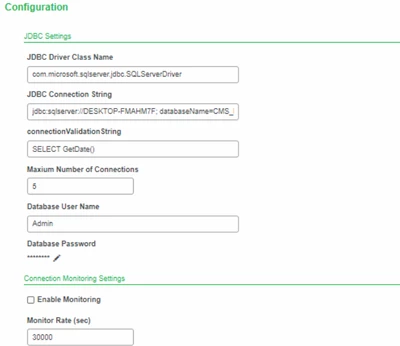
VaibhavShinde_0-1594038191977.png

Instead server name i tried putting 'localhost', 'ip Address' but still not.


Thanks

2 replies

19-Tanzanite
July 6, 2020

Hi @VaibhavShinde 


Your connection string is missing the port number, by default 1433 - it might not work if you changed that default port.

Also you need to ensure that SQLServer is configured to serve a static TCP/IP port, see https://www.ptc.com/en/support/article/CS263390.


Hope this helps

Regards

Christophe


16-Pearl
July 7, 2020

Hi @cmorfin ,

I tried both by putting 1433 as port and enabling TCP/IP or Enabling all ip ,also enabled named pipe.

but still not connecting..and still not getting any related error.


VaibhavShinde_0-1594105302087.png

Thanks,

19-Tanzanite
July 7, 2020

Hi @VaibhavShinde 


Two other thigns to check/try:

- make sure the firewall on both machine is not blocking communication. If possible do a test by stopping both firewall

- in your database thing, create a test SQL service  with a simple select * from <tableName>, replace <tableName> by a small table existing in your database.

Execute the service - this should give some additional error that could give some hints.


Regards

Christophe


Support
July 16, 2020

Hi @VaibhavShinde.


If one of the previous responses allowed you to resolve your issue, please mark the appropriate one as the Accepted Solution for the benefit of others with the same issue.


Thank you for participating in our community!


Regards.


--Sharon