
5-Regular Member
November 28, 2022
Solved

Stacked Label Chart with secondary y axis as Line

  • November 28, 2022
  • 2 replies
  • 1192 views

Hy!


I searched a long time for this and couldn't find an answer that suits me. So I will try and make my own topic about it.


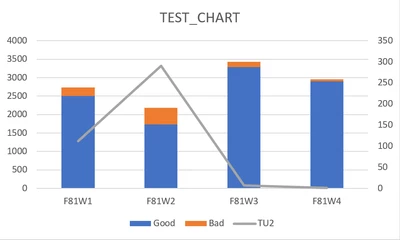
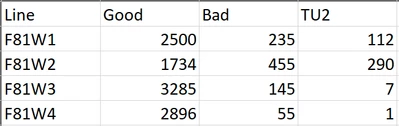
I have data that is showing me on different Items different counts of good, bad and TU2. I would like to have in one chart the items on the x-axis then the good and the bad on the primary y axis stacked and overall the TU2 on the secondary y-axis not stacked at all. Now I tried a lot. It is working with the secondary y axis when it is not stacked, but as soon as I click stack series it also sets my secondary y axis on the bottom just as a thin line and doesn't show me the secondary y axis at all. Now as a sample of what I want to achieve I made an example in Excel.
MS_9497713_0-1669645048133.png

MS_9497713_1-1669645356119.png


Is there a way to also achieve this in Thingworx?


BTW I am using Thingworx 9.3 for this project I am working on.


Best answer by slangley

Hi @MS_9497713.


We are able to confirm the issue you reported.  However, since you are using a legacy widget, no further bug fixes or updates are planned unless they are security related.  In a future release of ThingWorx, we are including the combo widget that may provide the functionality you need.


Regards.


--Sharon

2 replies

slangleyCommunity ManagerAnswer
Community Manager
December 16, 2022

Hi @MS_9497713.


We are able to confirm the issue you reported.  However, since you are using a legacy widget, no further bug fixes or updates are planned unless they are security related.  In a future release of ThingWorx, we are including the combo widget that may provide the functionality you need.


Regards.


--Sharon

Community Manager
June 5, 2023

Hi @unknown.


ThingWorx 9.4 is now available for download.


Regards.


--Sharon