16-Pearl
Sep 19, 2023 8:15 AM UTC
Solved

Styling data series on bar charts and schedule charts

Hi Experts,


Problem : A bar chart and a schedule each have a data set bound. These data sets are created dynamically. Therefore the number of series cannot be defined on a bar chart. (Consequently defining style formats for individual data series is not possible for the bar chart. )


Is it possible to give the same color to the bars that have the same name from the two different charts  ?

e.g.,

Bar Chart: Apple_Series = Green, Banana_Series = Yellow

Schedule Chart: Apple_Series = Green, Banana_Series = Yellow


Regards,
 

wcuiAnswer
16-Pearl
Sep 26, 2023 2:52 AM UTC

As an example, for Bar chart widget,

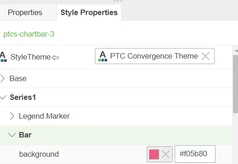
You can configure the bar color of each series by below setting. Note this is a hard setting. If Filed displaying order changed then it might not apply to your request.

wcui_0-1695696047735.png

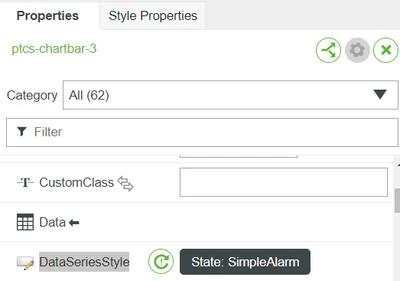
Under widget Properties, there is "DataSeriesStyle" property where you can set bar color of all series according to a special Filed value. This setting control bar color based on filed value not based on Filed Name. So I dont think this setting is good to your request.

wcui_1-1695696160454.png


Generally speaking, currently it is impossible to control bar color without using above 2 settings.


3 replies

wcui16-PearlAnswer
16-Pearl
Sep 26, 2023 2:52 AM UTC

As an example, for Bar chart widget,

You can configure the bar color of each series by below setting. Note this is a hard setting. If Filed displaying order changed then it might not apply to your request.

wcui_0-1695696047735.png

Under widget Properties, there is "DataSeriesStyle" property where you can set bar color of all series according to a special Filed value. This setting control bar color based on filed value not based on Filed Name. So I dont think this setting is good to your request.

wcui_1-1695696160454.png


Generally speaking, currently it is impossible to control bar color without using above 2 settings.


Translate
Janicen16-PearlAuthor
16-Pearl
Oct 6, 2023 6:07 AM UTC

Thanks @wcui .


For now I will just use conditional statements to display different colours for each series on the schedule chart. As for the bar chart, I will let the colours auto generate.


Regards.

Translate
16-Pearl
Oct 6, 2023 8:34 AM UTC

hi @Janicen, please mark the acceptable solution if you feel OK to close this post.

Translate