16-Pearl
April 3, 2024
Solved

Sub Menu's with a vertical alignment

  • April 3, 2024
  • 2 replies
  • 1071 views

Good day,

I want a sub-menu to appear on click or hover of an existing menu. How do I do this?

Also, why is it that the title gets removed when I specify a menu item as a type menu? 

Could you please assist me with the steps that I can follow to achieve this:

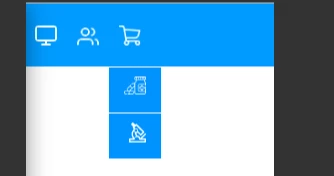
chrome_08Zy5SOX4O.png Currently what I do have is this: 

chrome_yWTDeah5c7.png

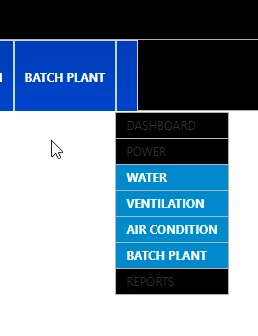
 The title has disappeared for the item of the main menu whose type is menu. (see the missing title below).

msedge_hsCVg0JoGY.png

 Many thanks

Best answer by Janicen

Hi all,

One way to get the titles to not disappear on the main items is to use a service and dynamically create a data source that you will use to bind to your menu widget on the mashup.


This is the link on how to create an infotable data source for the menu widget with the MenuEntry datashape: 

https://support.ptc.com/help/thingworx/platform/r9/en/index.html?_gl=1*yqc4lc*_ga*MTY3NTQ4NDEyMC4xNjk0NDMxOTky*_ga_7NMP2MSYPM*MTcxMjE0MzE4NS4xMTQuMS4xNzEyMTQzMjI5LjE2LjAuMA..#page/ThingWorx/Help/Mashup_Builder/Widgets/MenuBarDefiningtheMenuBarItemsUsinganInfotable.html


Step 1: Create infotable

let result = Resources["InfoTableFunctions"].CreateInfoTableFromDataShape({
infoTableName: "InfoTable",
dataShapeName: "MenuEntry"


Step 2: define the top-level menu items by making use of the keyword: "topMenu"  as the menuId. This will be an item of the main menu

result.AddRow({
linkDestination: '',
isDefault: false,
parentMenuId: 'topMenu',
imageURL: 'TableView',
linkTarget: '', // (Popup, Mashup, New)
description: '',
menuId: 'idLogs',
linkType: 'Menu',
title: 'Logs'
});


Step 3: To add a sub item to a main item, use the value of menuId from the main item and pass this value as the parentMenuId to the menuId property of the sub item:
result.AddRow({
linkDestination: 'AllSitesMashup',
isDefault: false,
parentMenuId: 'idLogs',
imageURL: 'SiteIcon',
linkTarget: 'Mashup', // (Popup, Mashup, New)
description: '',
menuId: 'idAllSites',
linkType: 'Mashup',
title: 'All Sites'
});


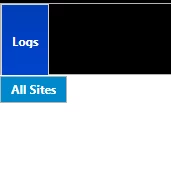
The above should give you something like this (see image attached)
chrome_cQ08CwcyWy.png

2 replies

16-Pearl
April 3, 2024

Hi @Janicen 

 Can you take a look at the below post, and let us know if it will help in your case or not?

https://community.ptc.com/t5/ThingWorx-Developers/Menu-Navigation-and-Sub-menu-with-Horizontal-alignment/td-p/854540

Janicen16-PearlAuthorAnswer
16-Pearl
April 3, 2024

Hi all,

One way to get the titles to not disappear on the main items is to use a service and dynamically create a data source that you will use to bind to your menu widget on the mashup.


This is the link on how to create an infotable data source for the menu widget with the MenuEntry datashape: 

https://support.ptc.com/help/thingworx/platform/r9/en/index.html?_gl=1*yqc4lc*_ga*MTY3NTQ4NDEyMC4xNjk0NDMxOTky*_ga_7NMP2MSYPM*MTcxMjE0MzE4NS4xMTQuMS4xNzEyMTQzMjI5LjE2LjAuMA..#page/ThingWorx/Help/Mashup_Builder/Widgets/MenuBarDefiningtheMenuBarItemsUsinganInfotable.html


Step 1: Create infotable

let result = Resources["InfoTableFunctions"].CreateInfoTableFromDataShape({
infoTableName: "InfoTable",
dataShapeName: "MenuEntry"


Step 2: define the top-level menu items by making use of the keyword: "topMenu"  as the menuId. This will be an item of the main menu

result.AddRow({
linkDestination: '',
isDefault: false,
parentMenuId: 'topMenu',
imageURL: 'TableView',
linkTarget: '', // (Popup, Mashup, New)
description: '',
menuId: 'idLogs',
linkType: 'Menu',
title: 'Logs'
});


Step 3: To add a sub item to a main item, use the value of menuId from the main item and pass this value as the parentMenuId to the menuId property of the sub item:
result.AddRow({
linkDestination: 'AllSitesMashup',
isDefault: false,
parentMenuId: 'idLogs',
imageURL: 'SiteIcon',
linkTarget: 'Mashup', // (Popup, Mashup, New)
description: '',
menuId: 'idAllSites',
linkType: 'Mashup',
title: 'All Sites'
});


The above should give you something like this (see image attached)

chrome_cQ08CwcyWy.png

16-Pearl
April 3, 2024

Hi @Janicen  Thanks for sharing steps.