1-Visitor
October 22, 2020
Solved

Switch to a mashup based on time of day

  • October 22, 2020
  • 1 reply
  • 3357 views

Hello,


I'm wondering if it is possible to switch to a mashup based on the time of day. My goal is to having something such as at 2:50 pm every day, the screen will switch to a mash up that says to start winding down and prepare for the shift change. Or at 7:00 am - 7:10 am every morning, the screen will ask the operators to check their equipment. Is this possible?


Thanks

Best answer by eliotlandrum

As @PaiChung said, you'll need a validator that checks the current time. Here's a demo of that:


1. Create a validator with the following code (I use the en-GB language because it will be in 24 hour format instead of 12 hour and won't include the AM/PM stuff at the end):

Output = (new Date().toLocaleTimeString('en-GB', {hour: '2-digit', minute: '2-digit'})) === "07:00"

or

Output = (new Date().toLocaleTimeString('en-GB', {hour: '2-digit', minute: '2-digit'})) === "07:10"


2. Put a refresh widget on the screen and set the Refresh Interval to 60. Connect the Refresh trigger to the Execute of the validator.

3. Create a Navigate action to go to the next mashup.

4. Connect the True trigger of the validator to the Navigate action.

5. Repeat on the secondary mashup to go back to the original one.

6. Be sure to test this on the target browser... I've heard that toLocaleTimeString may act differently on different browsers.
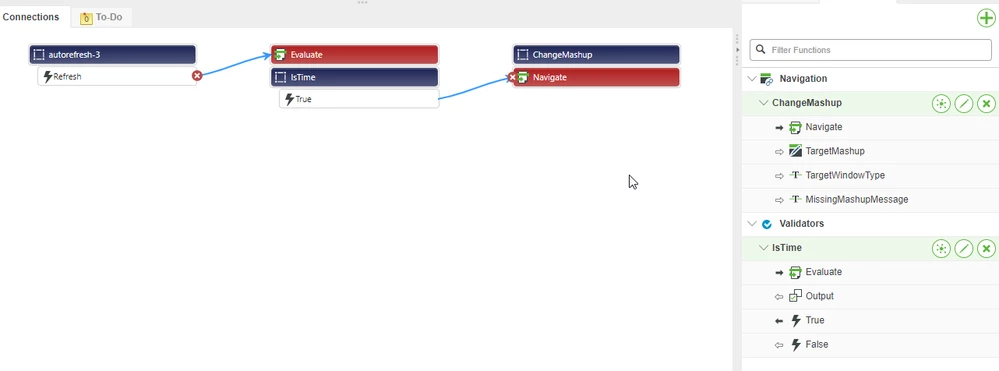

 

2020-10-23_11-53-05.png

1 reply

22-Sapphire I
October 22, 2020

You can run a Refresh widget into either a service or expression to then trigger a navigate widget.

1-Visitor
October 22, 2020

Hello,


Thanks for your response. How do I trigger the navigate function with a service? I thought I could make a scheduler, and then drag "scheduled event" onto the navigate function, but "scheduled event" does not show up when you add the scheduler to the data section of the mashup builder.


Thanks

3-Newcomer
October 22, 2020

it may be easier to use the tabs widget with each mashup on a different tab.  


You can then use a refresh widget to periodically run a service.  The output of that service would bind to "selectedTabName".