
1-Visitor
May 20, 2020
Solved

Tab Widget: How to style the white space between tab headers

  • May 20, 2020
  • 1 reply
  • 6673 views

Hi,


Is there a way to style the white space between the tab headers using any custom CSS or so? I tried using the below CSS:


.widget-ptcstabset::part(tabs-tab){

     margin-left:0px !important;
     margin-right:0px !important;
}


But this completely removes the white space. I want that space between tab headers, but is there any way to style or colour it? 


Thank you.
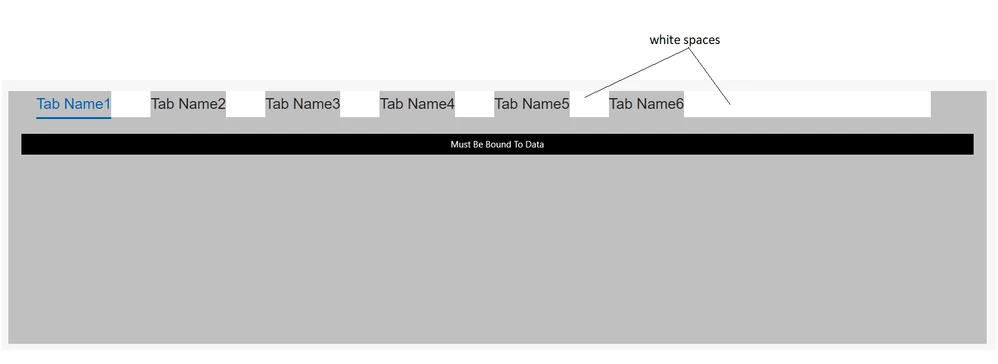
Tab.PNG

Best answer by cmorfin

Hi @nmt 


Just for info there has been an update on the article https://www.ptc.com/en/support/article/CS325847 with a custom css that should allow to configure the colour of the remaining header.


Hope this helps

Christophe


1 reply

19-Tanzanite
May 21, 2020

Hi @nmt 


CSS has not got many configuration for margin, however there are a few more option for border. So an idea would be to remove the margin and add border:

.widget-ptcstabset::part(tabs-tab){

margin-left:0px !important;
margin-right:0px !important;
border-left:24px;
border-right:24px;
border-top:0px;
border-bottom:0px;
border-color:yellow;
border-style:solid;


}


Hope this helps

Christophe


nmt1-VisitorAuthor
1-Visitor
May 21, 2020

Hi @cmorfin 


Thank you for your response!


I tried using the below code and it did remove the space between the tab headers, but the white space after 'Tab Name6' (as in the picture) is still the same, is there a way to style it?

19-Tanzanite
May 21, 2020

Hi @nmt 


Can you upload your sample mashup here, because I do not have this display on my side.

Also what version of ThingWorx are you using ?


Thanks

Christophe