
18-Opal
September 29, 2017
Solved

Teach me how to set a configuration table via SetConfigurationTables services

  • September 29, 2017
  • 3 replies
  • 4696 views

hi i'm SeonHo

I am preparing POC using MQTT extension.

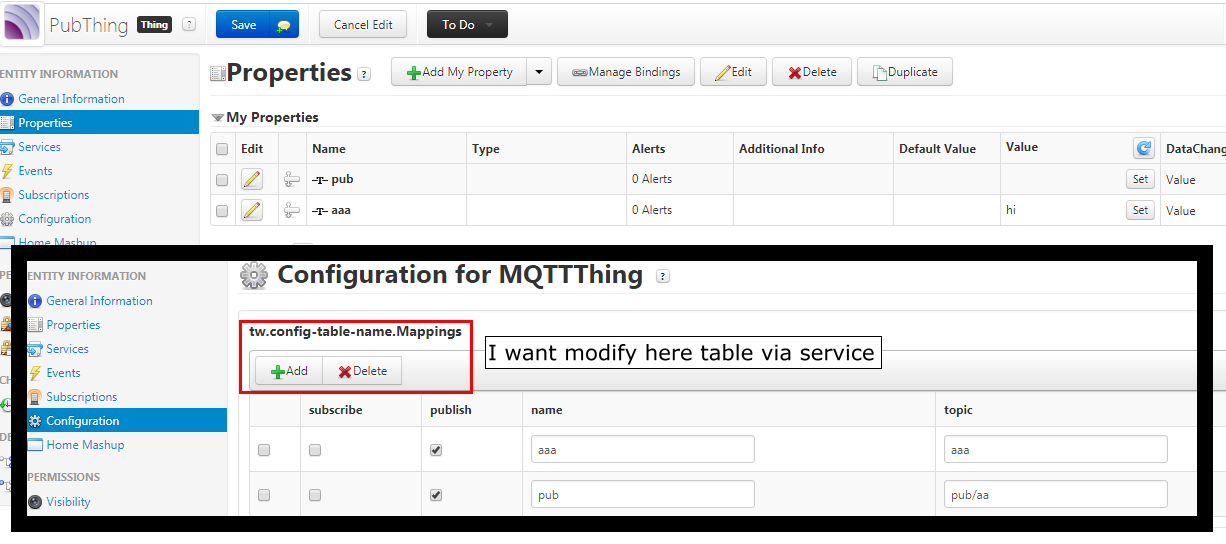
I need to configure the Thing's Configuratoin to publish the data.

If i set the topic, Publish works well.

I want Topic to be automatically formatted like a Subscribe.

Or I want to add or modify configuratoin through the service.

Please reply.

thanks
Best answer by CHASEONHO

i solved it through PTC Technical Support

and i attach code

//Add row to Mapping table in Configuration 

var params = {

    tableName: "Mappings" /* STRING */

};

// result: INFOTABLE dataShape: "undefined"

//DeviceID must be has "MQTTSubscriber" Thing template

var result = Things[DeviceID].GetConfigurationTable(params);

var newRow = new Object();

newRow.name = name;

newRow.publish = publish;

newRow.subscribe = subscribe;

newRow.topic = topic;

result.AddRow(newRow);

var params = {

    configurationTable: result /* INFOTABLE */,

    persistent: 1 /* BOOLEAN */,

    tableName: "Mappings" /* STRING */

};

Things[DeviceID].SetMultiRowConfigurationTable(params);

make service using attached code

and you can check added row at Mappings table in Configuration

3 replies

20-Turquoise
September 29, 2017

Please refer to the following article:

Article Viewer | PTC

And this is an article for MQTT general use:

https://www.ptc.com/en/support/article?n=CS246701

CHASEONHO18-OpalAuthor
18-Opal
September 29, 2017

Um ... You have not figured out the point of my question.

I am aware of the general usage of MQTT

So I receive the data value through communication now

The solution I'm looking for is to configure the configuration table of the MQTT extension through the service

Or like a subscription, the name and property value of the thing will automatically be used as a topic for publishing.

Thank you for answer

CHASEONHO18-OpalAuthorAnswer
18-Opal
January 25, 2018

i solved it through PTC Technical Support

and i attach code

//Add row to Mapping table in Configuration 

var params = {

    tableName: "Mappings" /* STRING */

};

// result: INFOTABLE dataShape: "undefined"

//DeviceID must be has "MQTTSubscriber" Thing template

var result = Things[DeviceID].GetConfigurationTable(params);

var newRow = new Object();

newRow.name = name;

newRow.publish = publish;

newRow.subscribe = subscribe;

newRow.topic = topic;

result.AddRow(newRow);

var params = {

    configurationTable: result /* INFOTABLE */,

    persistent: 1 /* BOOLEAN */,

    tableName: "Mappings" /* STRING */

};

Things[DeviceID].SetMultiRowConfigurationTable(params);

make service using attached code

and you can check added row at Mappings table in Configuration