5-Regular Member
April 28, 2025
Solved

Text field default value

  • April 28, 2025
  • 3 replies
  • 703 views

I have lots of text field widgets in my mashup where i want its default text to be coming from my Thing property values. Basically i want them already filled with the property values. This is to ease editing of the values for the users and to prevent them from starting all over again in case they wanna edit.


Mashup
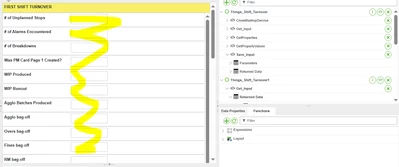
JY_11008628_0-1745804344163.png


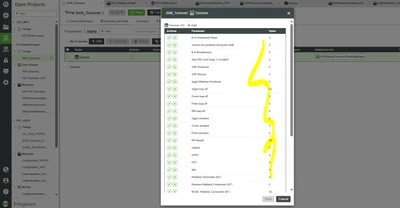
Property Values

JY_11008628_1-1745804424281.png

I created a service where it just returns this property infotable but when i try to bind in the mashup, there is no selected row that i can bind to the text field as its text source

 

Best answer by Sathishkumar_C

You need to develop a service that converts row-wise data into column-wise format.

  1. Create a DataShape: Define a DataShape (e.g., Sample_DataShape) that includes all the necessary parameters.
  2. Write the Service: Implement a service that reads the row values and transforms them into column values. The output should be an InfoTable with the DataShape of Sample_DataShape.
  3. Now map the values from new service output

Example:

Sathishkumar_C_0-1745903781043.png


3 replies

17-Peridot
April 29, 2025

You need to develop a service that converts row-wise data into column-wise format.

  1. Create a DataShape: Define a DataShape (e.g., Sample_DataShape) that includes all the necessary parameters.
  2. Write the Service: Implement a service that reads the row values and transforms them into column values. The output should be an InfoTable with the DataShape of Sample_DataShape.
  3. Now map the values from new service output

Example:

Sathishkumar_C_0-1745903781043.png


16-Pearl
April 29, 2025

Hi @JY_11008628,


What @Sathishkumar_C said is one way to tackle it but creating a datashape with that many fields is troublesome, not to mention your parameter names contain many special characters that are not allowed in a field name. It makes things harder.

If I were you, I wouldn't be using text fields. I would use Grid to show the infotable property and allow for edit.

It's much easier and you don't have to go through any trouble to do any row-column conversion implementation.


16-Pearl
May 6, 2025

Hi @JY_11008628,

It appears that a response to this post answers your question. For the benefit of other Community Members who may have the same question, it would be great if you could designate it as the Accepted Solution.


In the event that this response did not answer your question, please post your current status so that we can continue to support.


Thanks for using the PTC Community!


Regards,