

1-Visitor
April 18, 2017
Solved

Thingworx 7.4 MSSQL Install Errors

  • April 18, 2017
  • 12 replies
  • 6544 views

When executing the 'thingworxMssqlDBSetup.bat' file i get an error stating

"Sqlcmd: Error: Microsoft ODBC Driver 11 for SQL Server: TCP Provider: No connection could be made because the target machine actively refused it"

Here are the parameters i am using, the database is on the same machine so localhost should be correct.

server=localhost

serverinstance=SQLEXPRESS

port=1433

adminusername=sa

loginname=twadmin

database=thingworx

thingworxusername=%loginname%

schema=twschema

I have also checked that remote connections are enabled and that TCP/IP is also enabled for the SQL service. Anyone else had this issue?

Specs:

Windows Server 2012

Tomcat 8.0.33

jdk-8u121

SQL Server Express 2014

Thingworx 7.4 MSSQL

Thanks
Best answer by mfelton

Found the solution.

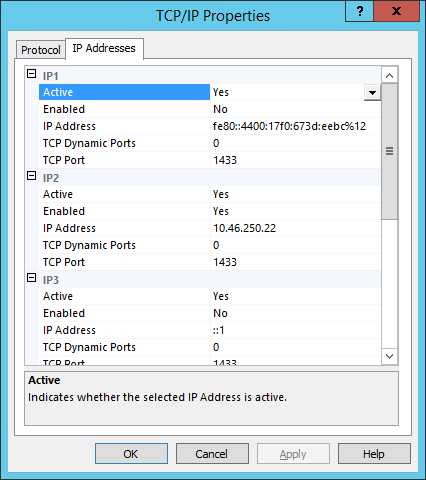
In the Configuration Manager -> SQL Server Network Configuration -> Protocols for *instancename* -> TCP/IP Properties -> Ip Addresses.

On all the available IPs i had to define the port was 1433 as seen below, after that, no problem!

12 replies

5-Regular Member
April 18, 2017

Matthew, is the Mixed mode enabled for the authentication on that particular instance? Are you able to authenticate on that instance via SQL Management Studio using SQL Server Authentication, apart from the default Windows authentication ?

mfelton1-VisitorAuthor
1-Visitor
April 18, 2017

Yes on both counts, I log in via SQL Server Authentications using the 'sa' account on the management studio which logs me in correctly without error.

5-Regular Member
April 18, 2017

Strange, i haven't had such an issue. Could you please try telnet something like this from the command prompt telnet <yourLocalIP> 1433

also please ensure that the SQL Server Browser Window's service is running

If this still doesn't help I would test by disabling the firewall/antivirus application, despite it's on local machine, just to ensure that somehow its not blocked. And if this would help add the exception to the firewall manually before switching it back on.

1-Visitor
May 24, 2017

Hi Guys,

I am facing same problem and I am not getting any luck with the proposed solutions.

This is what I am getting:

I have entered that 1433 port in every IP as well.

But still I am getting this problem!!!!!!
Please help me.......Thanks

5-Regular Member
July 21, 2017

Hi,

     If you did restart the SQL service after you did the changes that Matthew suggested and it still doesn't work, just change the status of the TCP/IP protocol from the SQL Server Configuration Manager from Disabled to Enabled, restart the service again and try. For me it worked like that

Thanks

1-Visitor
October 6, 2017

its this solution for ThingWorx-Platform-Mssql-8-1-0? I have same error message?

15-Moonstone
November 11, 2017

Thank you Matthew, you saved my day!!!