
1-Visitor
June 19, 2019
Question

Thingworx 8.4 - Time Series chart has no x or y axis

  • June 19, 2019
  • 1 reply
  • 2505 views

I've been playing around with Thingworx 8.4 Trial and for some reason I'm unable to set the Data Fields using using QueryPropertyHistory Data.  They just show up as blank and it seems no matter what I do it remains this way.  I've imported this from 8.3 and it was working correctly in that version.  I've created a new Thing and tried to use it's data and I still keep getting the same issue.  Not sure if it's another permissions issue but anyone have any ideas?
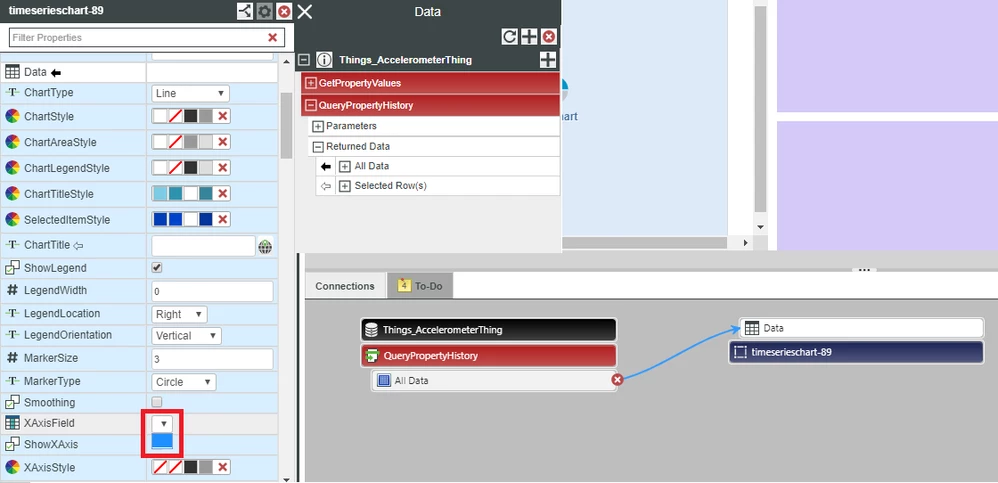
bug.png

1 reply

5-Regular Member
June 19, 2019

Hi, I'm using 8.4.2, TimeSeries chart could work in my side.

image.png

Do you have infotable result for your Accelerometer thing Query service? If it's blank, it may meet such problem

1-Visitor
June 19, 2019

How do I perform this check?


Additionally, adding in the data, when I run the mashup it will show all the values.  Yet I still can't select x or y axis.


bug2.png

5-Regular Member
June 20, 2019

You are using timeseries chart, so by default, the x chart will display Datetime value, and the y chart will display numeric value.   You have 6 lines in the chart, meaning that they are treated as 6 independent data sources.


If you want to select your own x,y chart, use Label chart instead.