
14-Alexandrite
October 6, 2025
Solved

Thingworx 9.6 Grid Edit Icon Size Change

  • October 6, 2025
  • 2 replies
  • 492 views

In TWX 9.6 the edit icon or link have padding and are too big. I can change this very easily in the console as shown below, but I cannot figure out how to do this in the CSS, or if there is another way. I am trying to do this...
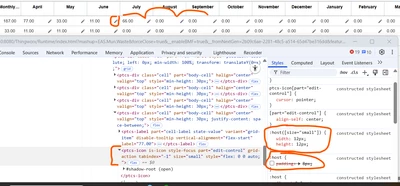
JO_9930585_0-1759770211886.png


I couldn't find any documentation on styling the grid specifically. I found this link, but it is not included..

https://support.ptc.com/help/thingworx/platform/r9.6/en/?_gl=1*7xyrcd*_gcl_au*MTQ1Nzk1OTMxMi4xNzQ0MDMxNzk1LjE1Mzg2MjI2OTYuMTc0NTUwOTk1NS4xNzQ1NTA5OTU2*_ga*MTM3NzIxMjUyOC4xNjU1NDAxNzYz*_ga_7NMP2MSYPM*MTc0NTUwOTk0MC4zMzkuMS4xNzQ1NTA5OTcyLjI4LjAuMA..#page/ThingWorx/Help/Mashup_Builder/Theming/ApplyingCustomCSSToWebComponents.html#

Best answer by TonyZhang

Hi @JO_9930585,


Try the following custom CSS:

Type Icon:

@supports (ptcs-style-unit: "PTCS-CORE-GRID") {
 [part ~= edit-control] {
 width: 12px !important;
 height: 12px !important;
 padding: 0 !important;
 }
}

Type Link:

@supports (ptcs-style-unit: "PTCS-CORE-GRID") {
 [part ~= edit-control] {
 font-size: xxpx !important;
 padding: 0 !important;
 }
}


Best,

2 replies

16-Pearl
October 7, 2025

Hi @JO_9930585    can you take a look at the example in the article below?

https://www.ptc.com/en/support/article/CS367776

14-Alexandrite
October 7, 2025

This article is for the old grid widget from 9.0 to 9.5. I am in 9.6 using the new widget.

TonyZhang16-PearlAnswer
16-Pearl
October 15, 2025

Hi @JO_9930585,


Try the following custom CSS:

Type Icon:

@supports (ptcs-style-unit: "PTCS-CORE-GRID") {
 [part ~= edit-control] {
 width: 12px !important;
 height: 12px !important;
 padding: 0 !important;
 }
}

Type Link:

@supports (ptcs-style-unit: "PTCS-CORE-GRID") {
 [part ~= edit-control] {
 font-size: xxpx !important;
 padding: 0 !important;
 }
}


Best,