1-Visitor
July 8, 2019
Solved

ThingWorx Azure IoT Hub Connector Not Starting Correctly

  • July 8, 2019
  • 11 replies
  • 5365 views

Hi All,


I've been working on getting this Azure IoT Hub Connector started for a while now, and it finally seemed like it was going to work however, when I enter the 'azure-iot.bat' command there's no output in my command prompt but the connection server appears in my ThingWorx platform.  While the command prompt is open, the cxserver file grows rapidly.  Then, if the command prompt is closed the connection server disappears from ThingWorx.


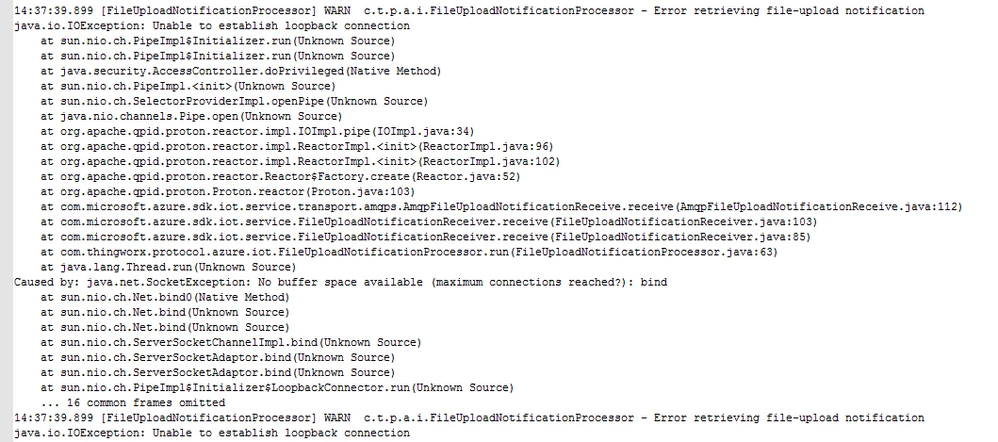
Is this normal behavior for the connector? Everything I've read says it should start to process data after entering the 'azure-iot.bat' command but I get no output in command prompt.  The images contain the different errors I am getting in my cxserver file.
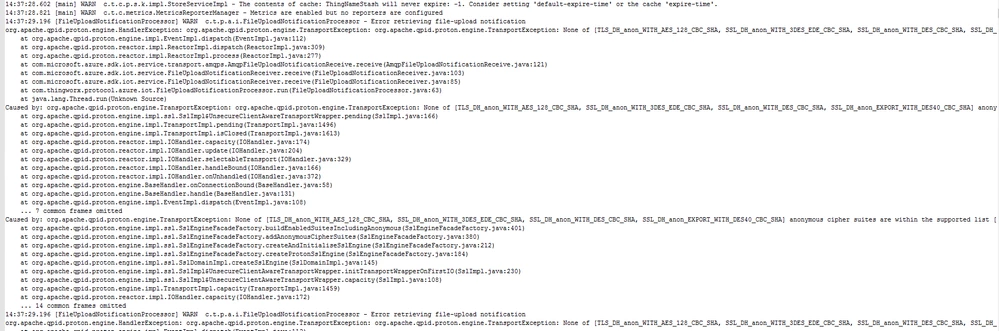
 

azure iot hub connector error.pngazure iot hub connector error 2.png

Best answer by slangley

Hi @Laurak9.


To answer your questions, when you execute the azure-iot.bat command, you are in fact starting the connector.  This window will need to remain open otherwise the connector shuts down.  This is by design.  This explains why you only see the connector in ThingWorx when the command prompt window is open.


In regard to the errors from the cxserver.log, are you still seeing the "entity does not exist error" or are you now seeing different errors?  If the former, please make sure you have followed the instructions from the ThingWorx Help Center for creating the thing.  The connector will not create the thing automatically--you will need to do so.


Regards.


--Sharon

11 replies

Support
July 10, 2019

Hi @Laurak9.


The behavior you are seeing is not normal.


We would need the following to troubleshoot:


  • The configuration in Azure
  • The azure-iot.conf file
  • Also, when running azure-iot.bat if you could output to a file, that would be helpful:  azure-iot.bat > azure-iot.log


Regards.


--Sharon

Laurak91-VisitorAuthor
1-Visitor
July 11, 2019

Hi Sharon,


I attached the azure-iot.conf file.  When I tried to output azure-iot.bat to a file, there is no output in the file.


Could you give some clarification on what you mean by configuration in Azure?

Support
July 11, 2019

Hi @Laurak9.


Thank you for your follow-up.


Did you scrub the azure-iot.conf file before sending?  It's hard to tell if some of the fields were scrubbed or not.


I am attaching the .conf file from an installation I tested a few months ago.  It hasn't been scrubbed since the values are no longer valid.  You can use this to see what kind of information is needed.  Also, in case you're not aware, this page from the ThingWorx Help Center provides detailed set up instructions including the configuration needed on the Azure side.


Something to note, however, is that the instructions are incorrect regarding the consumerGroup.  Don't use $Default.  You will need to set up a consumerGroup in Azure specifically for this connection.


Also, in the .conf file, you have some other parms that I'm not familiar with, so I recommend doing a comparison to the .conf I'm providing.


Once you have reviewed the instructions and made the needed updates to your configuration, please let me know if you still have issues.


Regards.


--Sharon