
1-Visitor
January 7, 2021
Solved

Thingworx flow installation

  • January 7, 2021
  • 1 reply
  • 1448 views

I have installed thingworx and flow in my machine (win 10), able to access thingworx and  workflow subsystem is shown as running, but when trying to access workflow composer getting blank screen(accessing via https and hostname ).

I;m using thingworx and flow 8.5.6


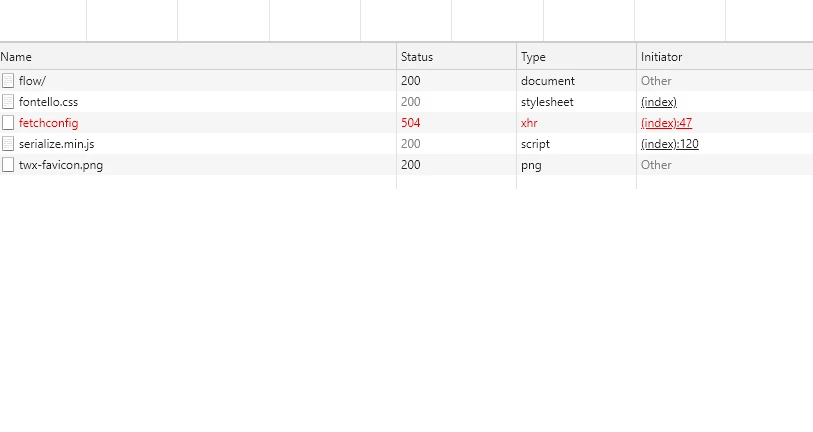
I can see 504 for enterprise/v1/fetchconfig enterprise/v1/fetchconfigUntitled.png 
Best answer by TT_9604451

Issue got solved , issue was because of residue of a failed flow installation and system firewall was blocking the thingworx flow service to start.

steps followed

1. removed residue from failed installation by steps mentioned in  link  though it is for 9+ version It kind of worked for me (I'm sing 8.5)

2. reinstalled after disabling firewall 

note : I was using hostname:port for assessing the flow composer.  

1 reply

Support
January 11, 2021

Hi @TT_9604451.


What url are you using to access Flow?  You need to be sure to use the hostname and port you indicated during the installation process.


Regards.


--Sharon

TT_96044511-VisitorAuthorAnswer
1-Visitor
January 11, 2021

Issue got solved , issue was because of residue of a failed flow installation and system firewall was blocking the thingworx flow service to start.

steps followed

1. removed residue from failed installation by steps mentioned in  link  though it is for 9+ version It kind of worked for me (I'm sing 8.5)

2. reinstalled after disabling firewall 

note : I was using hostname:port for assessing the flow composer.