
1-Visitor
July 26, 2021
Question

Thingworx Foundation 9.2.0 Install Error

  • July 26, 2021
  • 3 replies
  • 5855 views

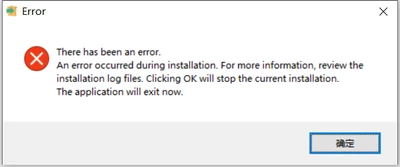
I was unable to install ThingWorx Foundation 9.2.0. It crushed and give no clue why it cannot finished install.

The entire folder will be deleted even before I press Accept button. The log is attached below. 

The java version is 11.0.12. JAVA_HOME = C:\Program Files\Java\jdk-11.0.12; Path: %JAVA_HOME%\bin
f0b783aad183f42668cc9d40f8b2ba2.png

3 replies

16-Pearl
July 26, 2021

Hello @KW_9996225 


Are you running the installer by checking the SSL configure checkbox?. If yes you can also skip checking that once and run the installer and SSL can be configured later once installation is done.


Apart from it you can also refer following article to resolve the issue

https://www.ptc.com/en/support/article/CS327735


Let me know if it didn't resolve the issue or you have any further concern.


Thanks

Om Dukiya

1-Visitor
July 26, 2021

No, I just skip the SSL setting.

17-Peridot
July 26, 2021

Some versions, including 9.1.3, 9.1.4 and 9.2.0 date codes, have been pulled out and  temporarily removed from the downloads.


It's probably due to security concerns and most likely not related to your issue, but mentioning it just in case...

17-Peridot
July 27, 2021

I've never encountered anything similar and actually only installed Thingworx using installer just once, so can only provide somewhat educated guesses.


1) First of all, have you tried to install on another machine? I always try to do it just to see if the issue is reproducible and/or tracks from previous installations don't interfere.

Installing on another machine (which are usually VMs these days) quite often succeeds so you can forget about the initially failed installation. I'm not a big fan of trying to poinpoint the cause of a random issue which only appears once and is not reproducible.


2) There are two lines of interest in the bitrock_installer_16884.log - the first one reports an error and the second one mentions the location of the additional log file. Is this log file available or gets deleted before you can get it? And can you attach / share the "C:\Program Files (x86)\ThingWorxFoundationH2Trial/ThingworxPlatform/platform-settings.json" file?


Error running C:\Program Files (x86)\ThingWorxFoundationH2Trial/installer/functions_files/json/read_json "-configfile=C:\Program Files (x86)\ThingWorxFoundationH2Trial/ThingworxPlatform/platform-settings.json" "-jsonpath=PlatformSettingsConfig.LicensingConnectionSettings.timeout": 2021/07/26 17:03:31 PlatformSettingsConfig.LicensingConnectionSettings.timeout does not exist
[18:03:31] Wait 560s for /\[[^\]]+Thingworx.war\][^\n]*\[[^\]]+\]/ in "C:\Program Files (x86)\ThingWorxFoundationH2Trial\tomcat\current\logs\thingworx-foundation-stderr.2021-07-26.log"


This seem to trigger aborting installation - the next line starts aborting installation


[18:07:36] Executing abort action : ccif_start_post component


3) A general note... You may call me old-fashioned and overcautious, but I try, whenever possible, to avoid installing stuff into folders containg spaces - nowadays it's usually OK, but I still encounter issues now and then with different software when using spaces in folder names.

1-Visitor
July 27, 2021

This time I install it in another place whose name get no space in it. Still failed. I may try on another mechine, thank you for advice.

17-Peridot
July 27, 2021

Well.... I believe I now see the possible cause and I think I've encountered something similar before...

So, platform-settings.json indeed doesn't have the PlatformSettingsConfig.LicensingConnectionSettings.timeout and Thingworx defaults to 560s

[18:03:31] Wait 560s for

Duing the installation you're supposed to automatically get the trial license from the PTC's licensing service, but the licensing generation server seem to not to respond promptly, so installer waits for the license, but times out somewhere around 240s (multiple "[18:xx:xx] waiting 5s" lines in the bitrock_installer_16884.log ).


Do you have something like "Configure licensing later" on one of the installation steps to try to skip this part?


I've encountered issues with automatically requesting / generating licenses (during startup, not installation, since I normally install manually, not using installer), but I've just tried to automatically get license (during Thingwox startup) and got one promptly, so, at least for commercial licenses, licensing generation service seem to work correctly at the moment, so my assumption about the root cause of your issue may be wrong.