12-Amethyst
January 13, 2025
Solved

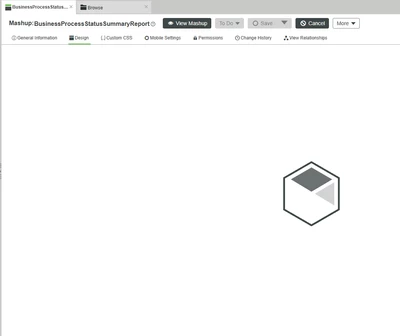
Thingworx Mashup doesn't load in Design Mode

  • January 13, 2025
  • 4 replies
  • 1492 views

ThingWorx 9.3.6-b1323

RG_11025060_0-1736774994472.png


Best answer by TL_9220870

I've had it a few times too, with different causes.

The following has helped me every time:


1. Clear browser cache
2. If that doesn't help, maybe check the expiration dates of the stored licenses, under subsystems - licensing subsystem settings - check the expiration date here and update it if necessary

3. if that doesn't help, restart Tomcat


Doing these three things has always helped, at least for me.

4 replies

16-Pearl
January 14, 2025

did the mashup work before? where does it come from?

does it render in "view mashup"?


I would try

- reloading without cache / in a private window. maybe just a browser cache issue.

- check in ApplicationLog if it complains about something

1102506012-AmethystAuthor
12-Amethyst
January 21, 2025

Mashup used to work before. No custom extensions were imported, I can view the mashup without any issues. It's just the EDIT mode I'm having trouble with. I've tried inprivate browser too, same issue.

13-Aquamarine
January 22, 2025

You can try duplicating this mashup and check if you are able to edit new mashup.


Also, is this mashup is imported from other server?, as if the project is built as extension and imported to production it can be non-editable.

13-Aquamarine
January 15, 2025

Also, please check if any custom extension is imported recently, that also cause issue if there is any issue in custom code.

14-Alexandrite
January 22, 2025

First click General Information tab and then come to Design tab sometime it happens, if its not working then try restarting tomcat, it might help you

12-Amethyst
January 30, 2025

I've had it a few times too, with different causes.

The following has helped me every time:


1. Clear browser cache
2. If that doesn't help, maybe check the expiration dates of the stored licenses, under subsystems - licensing subsystem settings - check the expiration date here and update it if necessary

3. if that doesn't help, restart Tomcat


Doing these three things has always helped, at least for me.
16-Pearl
February 28, 2025

Hi @11025060,

It appears that there are some replies to your question.  For the benefit of other Community Members who may have the same question, it would be great if you could designate one of them as the Accepted Solution.

In the event that this response did not answer your question, please post your current status so that we can continue to support.

Thanks for using the PTC Community!

Regards,
Charles
