14-Alexandrite
July 21, 2026
Solved

ThingWorx MCP

  • July 21, 2026
  • 7 replies
  • 128 views

Hello

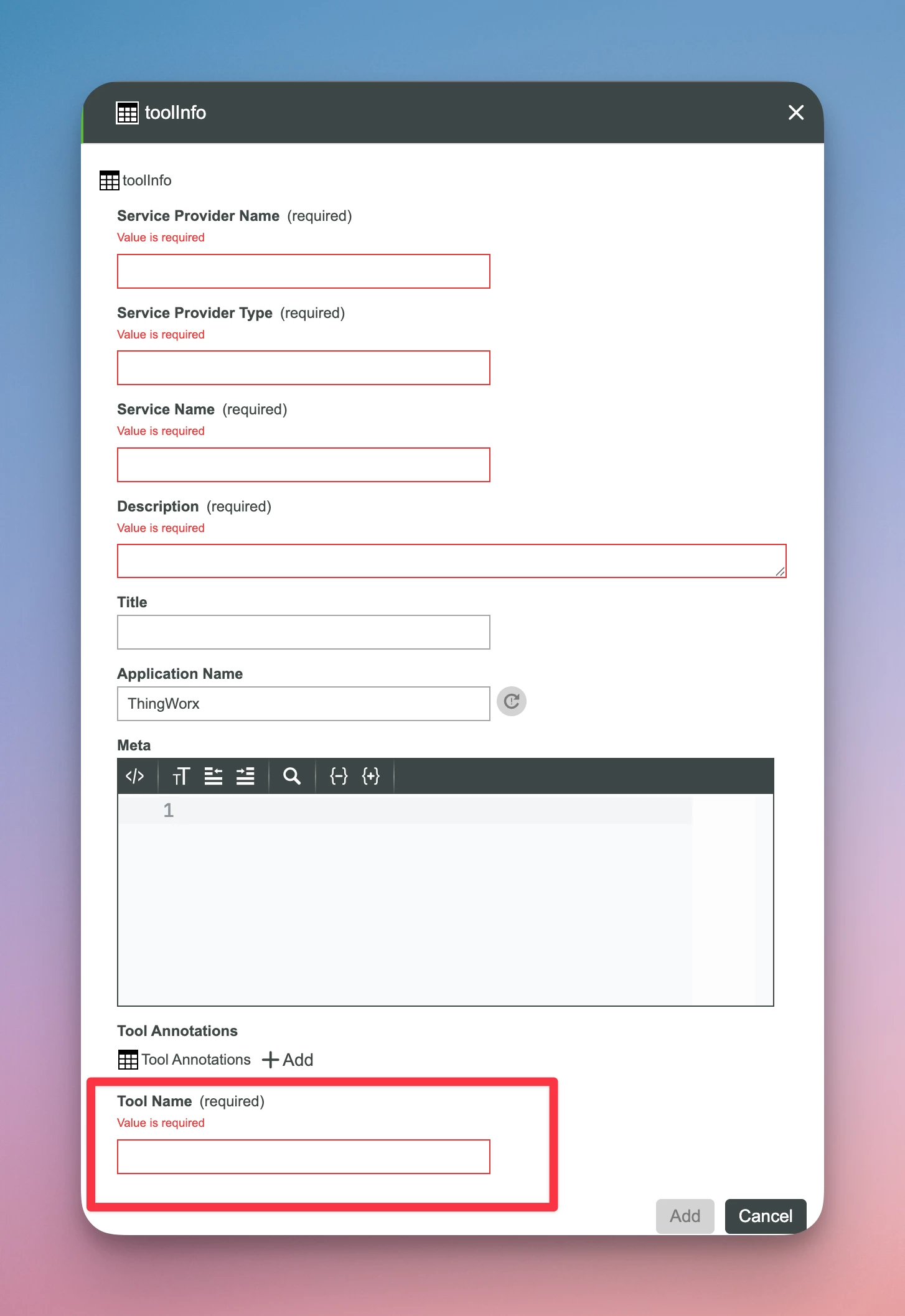
I am not able to register any tools using AddTools in the MCP resource.

It won’t accept the inputs I make

Is there ANY documentation on this or help more than the very limited information in Help pages?

I want to expose a service that takes a string input and gives a JSON response for instance
Best answer by rogerjn

Hi ​@Ascherer17 

I can see that you have the same issue. I found the workaround but not the cause.

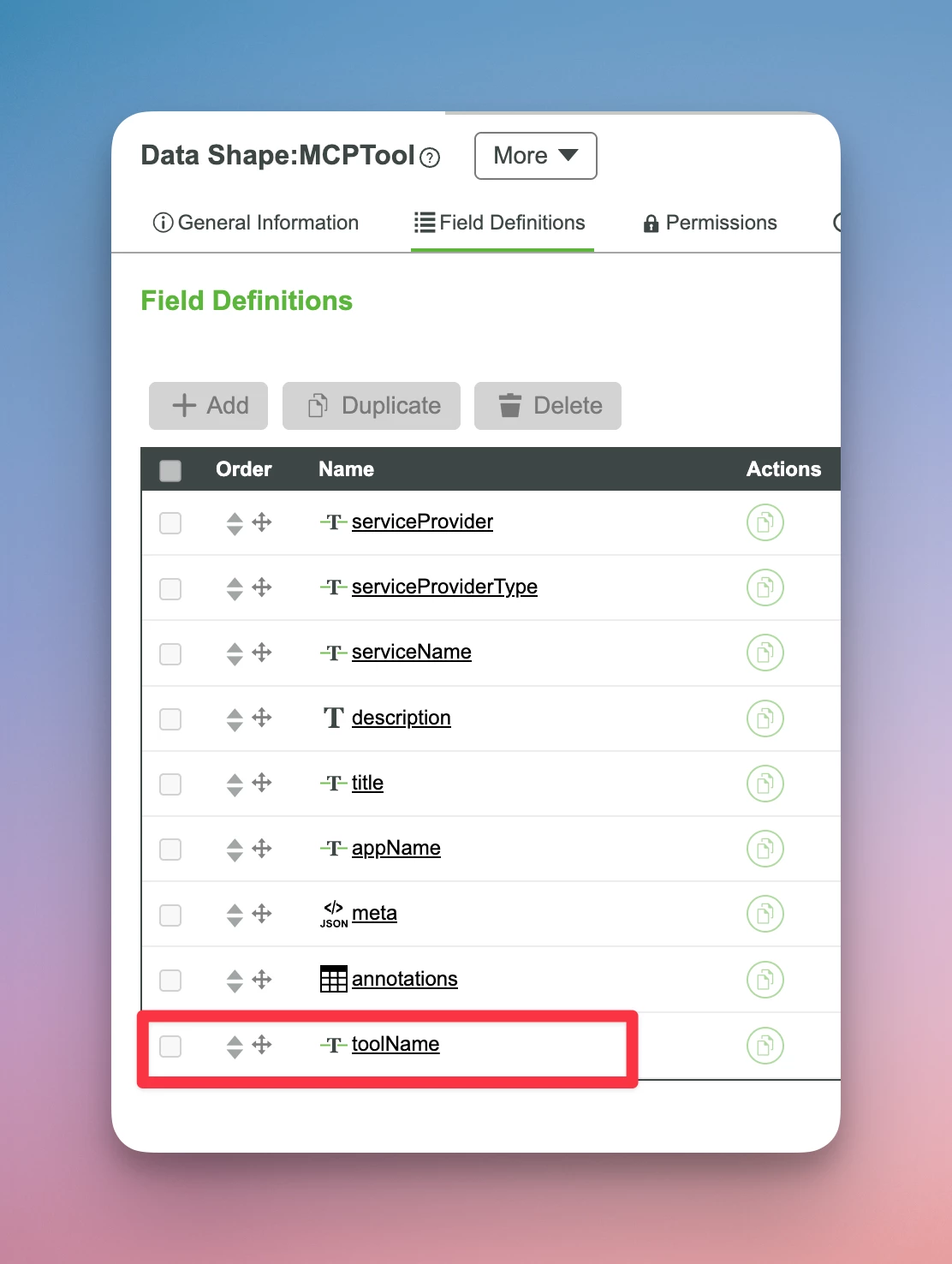
You are also missing the “Tool Name” in the Datashape “MCPTool”. I have no idea why this is missing but the workaround is to add it as the MCP Server expects it to be there!

Unfortunately this datashape is uneditable by the system and also not importable.

My workaround was to update the datashape in the database itself by adding it to the JSON definition…

Now it works!

MCPTool datashape as it should look


7 replies

Support
July 22, 2026

Hi ​@rogerjn 

Which version of ThingWorx are you running? 

Regards.

--Sharon

rogerjn14-AlexandriteAuthor
14-Alexandrite
July 23, 2026

Hi Sharon,


We are running 10.1.1

Also, following the example in Help pages does not work either. The ‘Add Tools’ is not adding anything…

/Roger

16-Pearl
July 29, 2026

I confirm. TWX 10.1.0 it works and with 10.1.1 fails with specified error. toolName seems to be required on 10.1.1 but not defined in DS.


Workaround adding Tool it via service call:

let mcpTools = Resources["InfoTableFunctions"].CreateInfoTableFromDataShape({
infoTableName: "InfoTable",
dataShapeName: "MCPTool"
});
// manually add the attribute to the infotable
mcpTools.AddField({
name: "toolName",
baseType: 'STRING'
});
mcpTools.AddRow({
serviceProvider: "<YOURTHINGNAME>",
serviceProviderType: "Thing",
serviceName: "<SERVICENAME>",
description: "<DESCRIPTION>",
toolName: "<TOOLNAME>",
title: undefined,
appName: undefined,
meta: undefined,
annotations: undefined,
inputSchema: undefined,
outputSchema: undefined
});

result = Resources["MCPServices"].AddTools({
toolInfo: mcpTools
});

With that it adds the tool and is returned on GetAllTools. Did not try to invoke it via MCP yet.

Ascherer17
16-Pearl
July 27, 2026

I am having the same problem in Thingworx 10.1.1.  Based on the Examples Help Center doc, I tried using the following inputs into “AddTool”.  The output is blank/No Data and I get an error in the Application Log stating “Tool name cannot be null or empty.”
I’m using VS Code to connect/start the MCP server as the Help Center mentioned.


rogerjn14-AlexandriteAuthorAnswer
14-Alexandrite
July 28, 2026

Hi ​@Ascherer17 

I can see that you have the same issue. I found the workaround but not the cause.

You are also missing the “Tool Name” in the Datashape “MCPTool”. I have no idea why this is missing but the workaround is to add it as the MCP Server expects it to be there!

Unfortunately this datashape is uneditable by the system and also not importable.

My workaround was to update the datashape in the database itself by adding it to the JSON definition…

Now it works!

MCPTool datashape as it should look


Ascherer17
16-Pearl
July 28, 2026

Great find!  I was able to replicate this and use the AddTool service.  I think you should mark your reply above as the answer. 

Hopefully this bug will be fixed when the capability is released in GA.  The part that is confusing is that the service works fine in the demo video below, about 7:30 mark. 

UPDATE: Checked the help center use cases doc again and noticed no mention of “Tool Name” either. https://support.ptc.com/help/thingworx/platform/r10.1/en/#page/ThingWorx/Help/ArtificialIntelligence/SampleUseCases.html

Support
July 28, 2026

Hi ​@Ascherer17 & ​@rogerjn.

Good job on finding a workaround!

I checked to see if this issue has been reported and it does appear that a fix will be coming in 10.2.  That release is targeted for release in the next few weeks.

Regards.

--Sharon