1-Visitor
October 26, 2018
Solved

Thingworx Trial Installation fails

  • October 26, 2018
  • 1 reply
  • 4701 views

Hello everyone,


so I am trying to install the latest Thingworx Foundation trial. The downloaded trial only contains the twxFoundationH2Trial-8.3.2-windows-installer.exe file.


After having set a password and trying port 80 (and 8080) the installation fails after "Waiting for the Thingworx Platform".


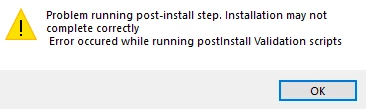
Then the following Error Windows appear:
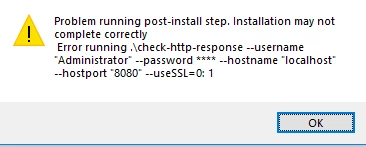
installError.PNG

installError2.PNG

Attached you can find the installation log.


Any help is appreciated very much.


Best Regards,

Dominik
 

Best answer by slangley

Hi @drieder.


It probably won't work given you've made previous attempts.  However, before trying it on another machine, what o/s are you running?  Is it 64-bit?  Did you confirm you pointed the release to a supported 64-bit java version?


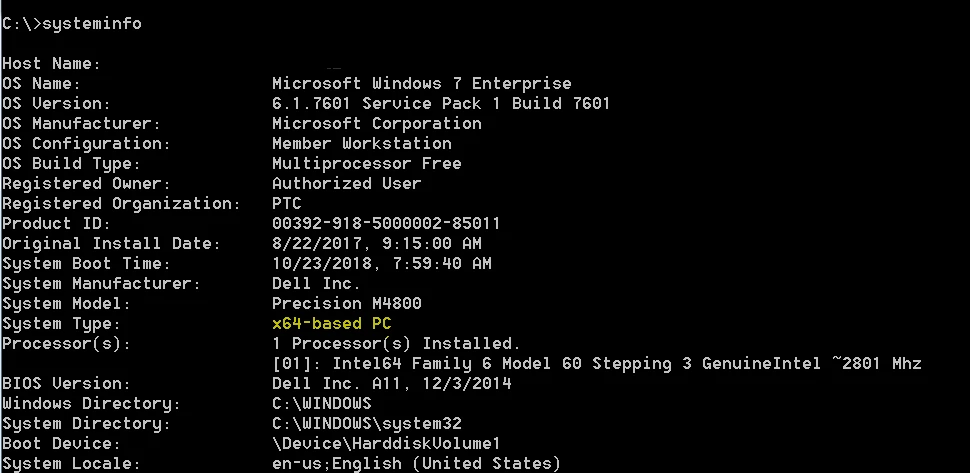
To check the o/s version, you can run the following command from the command prompt:  systeminfo

os.PNG


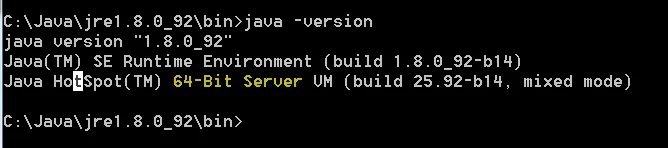
To validate that you are running a 64-bit java version, navigate to the java installation on your machine and run:  java -version


java_version.PNG


Refer to the documentation on the support portal for validating the system requirements before running the installer.


Regards.


--Sharon

1 reply

17-Peridot
October 26, 2018

Hi Dominik,


Have you set a password with length = 10 , havint at least one uppercase letter, one digit, one special char?


If not, try to set a password  (running again installation executable) for Administrator having 10 chars, one uppercase letter, one digit, one special char.


Thank you,

Raluca Edu

drieder1-VisitorAuthor
1-Visitor
October 26, 2018

Hello Raluca,


thank you for your reply. I have tried to run the installation again with the password "Th1ngworx!" and the same error appeared.


Regards,

Dominik

Support
October 26, 2018

Hi @drieder.


Is it possible that you already have something listening on port 8080?  This is the default for Tomcat.  You can run the following command from the command prompt to see if the port is already in use:  netstat -ano


Or you can try changing to a different port, like 8989. 


Note: Now that you have made previous attempts to run the installer for the trial version, it may not be possible to install.  The best thing to do is to try it.  If it continues to fail, you will need to either install it on a different machine or perform a clean install of the o/s on the existing machine to remove the hooks that are created when the installer is run.


Regards.


--Sharon


If my response has answered your question, please mark it as the Accepted Solution, for the benefit of others who may have the same question.