
pshashipreetham
18-Opal
18-Opal
September 12, 2021
Solved

Time Series Chart Design Issue

  • September 12, 2021
  • 2 replies
  • 3313 views

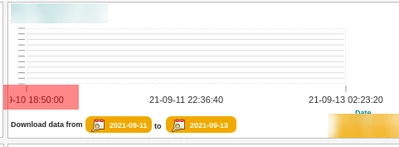
What ever changes I make in the Widget Properties the following issue is repeating again and again, the TimeStamp can't be seen totally on the dashboard, it is only half shown. 
psp316r_1-1631465790156.png


Thanks,
Shashi

Best answer by pshashipreetham

So, 

This issue is in 9.3.4 (latest Thingworx version) for Line Chart, this can only fixed by padding in the Style properties of the widget, in chart layout section, after certain days, Y axis was also overlapping on the X Axis, only way it got fixed is by mentioning Number of Y Axis Data points instead of keeping it auto and Increasing the height in the Widget Properties.

Thanks,

2 replies

17-Peridot
September 15, 2021

@pshashipreetham ,


Can you tell me which version of ThingWorx this is and what the actual widget name is?


--Nick  

pshashipreetham
18-Opal
18-Opal
September 15, 2021

Hi @nmilleson ,

The Thingworx version 8.5 and it is the Time Series Chart !!

Thanks
Shashi.

17-Peridot
September 23, 2021

@pshashipreetham ,


Sorry for the delay.  There are actually two widgets with that same name.  Can you tell me which icon is in front of it?


nmilleson_0-1632404234054.png


--Nick

pshashipreetham
18-Opal
pshashipreetham18-OpalAuthorAnswer
18-Opal
December 7, 2022

So, 

This issue is in 9.3.4 (latest Thingworx version) for Line Chart, this can only fixed by padding in the Style properties of the widget, in chart layout section, after certain days, Y axis was also overlapping on the X Axis, only way it got fixed is by mentioning Number of Y Axis Data points instead of keeping it auto and Increasing the height in the Widget Properties.

Thanks,
