
1-Visitor
May 17, 2017 2:20 PM UTC
Solved

To generate dynamic values infotable while inserting/updating data table

Am writing service to add or update record in data table and input to my service is "Tag" which will hold value like "Temperature".

My data table has fields like device_name, temperature, flow, pressure, etc (8 other fields).

So at run time i will get to know which field to update of data table but "AddOrUpdateDataTableEntry" service takes "values" in its params and this value is like empty

infotable which gets created like this :

var values = me.CreateValues();

values.DeviceName = deviceName;

values.Temperature = value;

values.Pressure1 = value;

values.Flow = value;

i dont want to check if tag value is "temperature" then values.Temperature = value because i need to write 10 if conditions as i have 10 fields

am unable to append tag value(temperature) to values.

how to create variable for above values at run time?
AnnaAnAnswer
14-Alexandrite
May 18, 2017 5:15 AM UTC

Dear Nisha,

Did you consider to use a for iterator to loop your Data Table fields and match it with your Tag, and then set value accordingly?

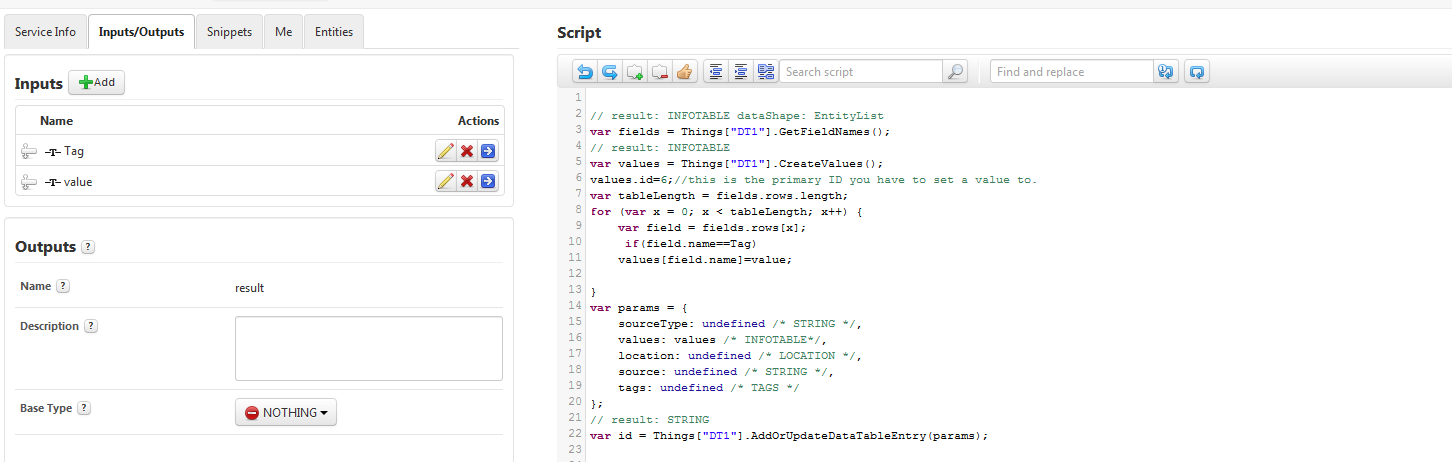
Here is my code:

Attached here:

// result: INFOTABLE dataShape: EntityList

var fields = Things["DT1"].GetFieldNames();

// result: INFOTABLE

var values = Things["DT1"].CreateValues();

values.id=6;//this is the primary ID you have to set a value to.

var tableLength = fields.rows.length;

for (var x = 0; x < tableLength; x++) {

var field = fields.rows;

  if(field.name==Tag)

    values[field.name]=value;


}

var params = {

sourceType: undefined /* STRING */,

values: values /* INFOTABLE*/,

location: undefined /* LOCATION */,

source: undefined /* STRING */,

tags: undefined /* TAGS */

};

// result: STRING

var id = Things["DT1"].AddOrUpdateDataTableEntry(params);

I set an id for the Data Table static but you could set it with your own dynamic way.

Thanks,

Br,

Anna

2 replies

AnnaAn14-AlexandriteAnswer
14-Alexandrite
May 18, 2017 5:15 AM UTC

Dear Nisha,

Did you consider to use a for iterator to loop your Data Table fields and match it with your Tag, and then set value accordingly?

Here is my code:

Attached here:

// result: INFOTABLE dataShape: EntityList

var fields = Things["DT1"].GetFieldNames();

// result: INFOTABLE

var values = Things["DT1"].CreateValues();

values.id=6;//this is the primary ID you have to set a value to.

var tableLength = fields.rows.length;

for (var x = 0; x < tableLength; x++) {

var field = fields.rows;

  if(field.name==Tag)

    values[field.name]=value;


}

var params = {

sourceType: undefined /* STRING */,

values: values /* INFOTABLE*/,

location: undefined /* LOCATION */,

source: undefined /* STRING */,

tags: undefined /* TAGS */

};

// result: STRING

var id = Things["DT1"].AddOrUpdateDataTableEntry(params);

I set an id for the Data Table static but you could set it with your own dynamic way.

Thanks,

Br,

Anna

Translate
nbhagtani1-VisitorAuthor
1-Visitor
May 18, 2017 6:21 AM UTC

Thanks Anna it worked

Translate