
16-Pearl
January 9, 2023
Question

Trying to create Expand collapse the container using button

  • January 9, 2023
  • 1 reply
  • 2874 views

Hi Team,

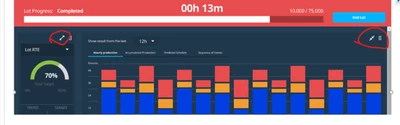
as i shown in below image , trying to create Expand and collapse button on container, 

but in second container(Chart) button i need at top right above the chart. Is it possible in Thingworx 9.3?

pls suggest how we can design this. 
 

VaibhavShinde_0-1673245583654.png


Thanks,

VS

1 reply

17-Peridot
January 9, 2023

Make container as fixed size in layout tab and try following article...

Expanding and Collapsing Containers

16-Pearl
January 9, 2023

Hello Sathish,

Thanks for the reply, I followed same article but still  can't achieve as i want . pls see below use case

I have metric and Graph panel , if I expand metric, two more metrics should see (Total 3 are there , by default only 1 can see without expand). It means can we adjust Collapse size upto two metric?


Thanks,

VS


17-Peridot
January 9, 2023

try import and test... hope it will be helpful.