
13-Aquamarine
April 15, 2021
Solved

Twx 8.5 Time series chart with multiple lines

  • April 15, 2021
  • 3 replies
  • 3854 views

Hi everybody,

My problem is that I want to choose multiple items in the list and I want  the historical data of the device appear in the chart. I have a service that receive a infotable from the list and get the historical data of the devices selected. The result of the service historical data is the following image when a I put in the input 2 devices.


LC_9552411_0-1618488622475.png

LC_9552411_1-1618488705977.png

but I want to binding this data to the chart. When I select the 2 devices I want a line with  the historical data 'DispositivoTemperatura_1' and another with the historical data 'DispositivoTemperatura_2', but if I select 3 I want 3 lines, select 4 4 lines... 
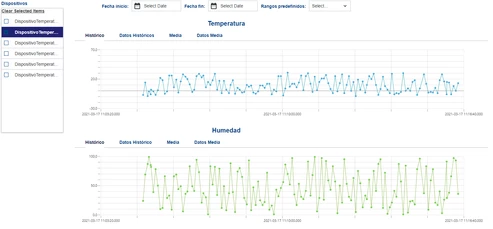
graficas.pngIs it posible to do? How?

Is necesary make a service for change the rows data in columns of each device?  

Thanks in advance,

Luis.

Best answer by PaiChung

It's been a few versions back since I've done this, but when I used QueryNamedPropertyHistory, the series all had different styles, they were basically the default styles for the Data1,2,3,4 etc. series.

Not sure if that Widget has changed a lot or not.

3 replies

5-Regular Member
April 15, 2021

Hi @LuisCabello 


Have you checked the Multiple Y-axis feature of Time series widget. I think it will help you to achieve your use case. Pleas see the screenshot for your reference


tdixit_0-1618490005708.png


Please refer help center  for more details


Regards,

Toolika Dixit

22-Sapphire I
April 15, 2021

The time series chart can auto configure itself based on the number of series in the infotable.

I have done this by have a list of Properties that are logged for a Thing (GetLoggedProperties)

and then feed that into QueryNamedPropertyHistory to get selected series.

That output then goes to the timeseries chart and it will auto render.

13-Aquamarine
April 16, 2021

Hi @PaiChung and @tdixit,

Thank you for reply :).


With the service that I said yesterday efectively works and as @PaiChung said it is autoconfigured by Thingworx (I had to change name of one field in the data shape and later it worked).

but now I have another question. Is it posible change the color of each line for device selected?

11.PNG


22.PNG 

Remember that my service returns in this shape.

image(3).png


I want the temperature data line of my thing "DispositivoTemperatura_1" in red and "DispositivoTemperatura_2" in blue. How can I configure or what I have to do?


Thank you so much.


Luis


22-Sapphire I
April 16, 2021

The time series chart should've automatically given different colors per series, not sure if you have some CSS that overrides that. You should see that in the chart properties as it should provide configuration for each series.

The very advanced and more complicated way that I believe is possible is to provide styling/css based on what is selected. I've never done this and this might be a bit challenging if you aren't familiar with CSS

Community Manager
May 10, 2021

Hi @LuisCabello.


If you feel your question has been answered, please mark the appropriate response as the Accepted Solution for the benefit of others with the same question.


Regards.


--Sharon