
1-Visitor
September 30, 2020
Solved

TWX 9.0 Toggle Button CSS

  • September 30, 2020
  • 2 replies
  • 1361 views

All - I need some help making a Toggle widget larger to support mobile design. I'm wanting to make the size of the "rectangle" larger and it looks like CSS is the only option.  My problem is that I do not know what to do in the CSS to make this happen.  Any help would be appreciated.


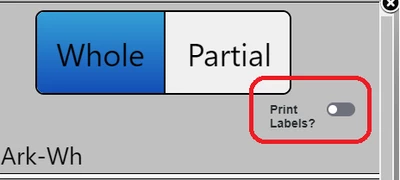
Toggle Size needing to make larger. Note, the "Partial" button at the top of the image is about the size of a finger tip on the mobile. I'd like the toggle to be the same size.
bmehringer_0-1601481414721.png


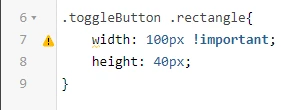
Below is some CSS I'm trying. I know little about CSS, so any help is much appreciated.
bmehringer_1-1601481478455.png


Also, it's important to note that this is all embedded in a Collection Widget.


Thanks for the help.


Best answer by SachinSharma

Toggle button has height and width properties which you can try. They do not change the height and width of the actual button rather they increase the area the widget uses so, if you click anywhere in that area and not explicitly on the toggle button it still works.

2 replies

16-Pearl
October 1, 2020

Toggle button has height and width properties which you can try. They do not change the height and width of the actual button rather they increase the area the widget uses so, if you click anywhere in that area and not explicitly on the toggle button it still works.

Support
October 1, 2020

Hi @bmehringer.


If you feel your question has been answered, please mark the previous post as the Accepted Solution for the benefit of others with the same question.  In addition, if you would like to submit a suggestion for improvement, you may do so on the ThingWorx Ideas board.  This will allow others to vote for it which will increase it's chances of being considered for a future release.


Regards.


--Sharon