
14-Alexandrite
April 3, 2025
Solved

TWX 9.6 Grid styling the sorting icon

  • April 3, 2025
  • 1 reply
  • 918 views

The new grid has a sorting icon that takes up a lot of space when space is limited. I am trying to style this to remove this 8px margin. Any idea on how to remove this?
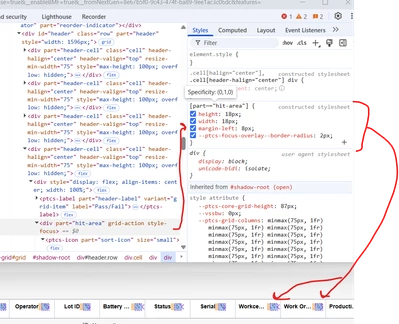
JO_9930585_1-1743711334301.png


Alternatively, is there a way to remove the icon completely out of the box and just have the column clickable similar to the old widget? 


Best answer by TonyZhang

Hi @JO_9930585,


Please try the following custom CSS. Ensure to verify if custom CSS is still working after you upgrade your ThingWorx.

@supports (ptcs-style-unit: "PTCS-CORE-GRID"){
 [part=hit-area]{
 margin: 0;
 }
}


1 reply

TonyZhang16-PearlAnswer
16-Pearl
April 17, 2025

Hi @JO_9930585,


Please try the following custom CSS. Ensure to verify if custom CSS is still working after you upgrade your ThingWorx.

@supports (ptcs-style-unit: "PTCS-CORE-GRID"){
 [part=hit-area]{
 margin: 0;
 }
}


14-Alexandrite
April 17, 2025

Thingwors is saying this is invalid css and will not let me save this..

JO_9930585_0-1744906986590.png


16-Pearl
April 18, 2025

Hi @JO_9930585,


Forgot to mention that please turn off the Linting (the toggle button) and you should be able to save the mashup successfully.