
1-Visitor
February 17, 2020
Solved

Unable to connect to MQTT BROKER

  • February 17, 2020
  • 4 replies
  • 3925 views

Hey hey Community,

I have following scenario.

I have Thingworx Foundation 8.5 (Trial), Imported MQTT Extension and have already created a,

new thing called "VerneMQconnect", as MQTT Connect,
new thing called "VerneMQsubscribe", as MQTT Subscriber

But the Problem is that the VerneMQconnect always show "Disconnected"
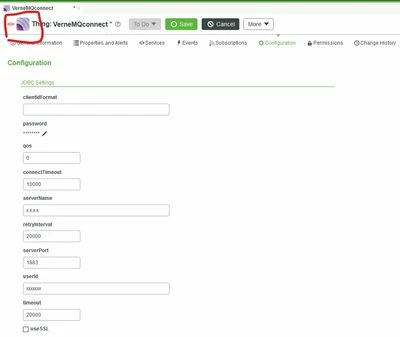

001.jpg

and "isConnected" never turn "True" it's always "False". 
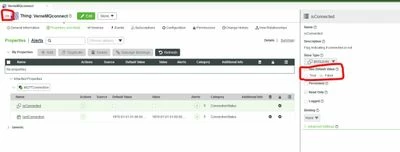
002.jpg

There is no firewall issue or somthing like that. I have tested the MQTT Broker in different ways ant it always worked without problems. Except in Thingworx, here it doesn't even manage to connect to the Broker. The Error Log schows:


Best answer by rjanardan

This is a bug. I am assuming you are using v2.1.0 of the MQTT extension. When using v2.1.0 & ThingWorx 8.5 isConnected and lastConnection properties are not updated. Publishing and subscribing properties works fine. v2.1.0 also works fine on 8.4.


This has been fixed in MQTT Extension v2.1.1.

4 replies

17-Peridot
February 18, 2020

Hi,


Can you attach logs to see errors? 


Thanks,

Raluca Edu

Franz931-VisitorAuthor
1-Visitor
February 24, 2020

First of all I want to say thank´s for the answers

image (2).png

Unfortunately, i forgot to attach the Picture.

15-Moonstone
February 20, 2020

Which MQTT broker are you using?

If you are using RabbitMQ, you need to enable MQTT protocol (1883 port ) by executing below command:

rabbitmq-plugins enable rabbitmq_mqtt

And then create a new user that has privilege to do remote desktop, command such as:

rabbitmqctl add_user mqtt-test mqtt-test
rabbitmqctl set_permissions -p / mqtt-test
".*" ".*" ".*"
rabbitmqctl set_user_tags mqtt-test management


If you are using Mosquitto broker, that will be easier, just start Mosquitto.


You can test MQTT template as well (MQTT is one of three templates, rather than MQTTConnection), it has connection and subscriber together.

For RabbitMQ broker/thing with MQTT template, you need to set servername/userId/password/mappings; for Mosquitto broker/thing with MQTT template, you just need to set servername/mappings.

I attached a simple explanation about MQTT that was created by our colleague before, hope it helps.

1-Visitor
February 20, 2020

sSame issue.


It never shows 'connected' when using Thingworx 8.5 Trial verision and it is actually connected cos the property is updated.


But a big issue is that the Thing Entity fails to reconnect after the MQTT broker restarts.

rjanardan16-PearlAnswer
16-Pearl
February 20, 2020

This is a bug. I am assuming you are using v2.1.0 of the MQTT extension. When using v2.1.0 & ThingWorx 8.5 isConnected and lastConnection properties are not updated. Publishing and subscribing properties works fine. v2.1.0 also works fine on 8.4.


This has been fixed in MQTT Extension v2.1.1.

Franz931-VisitorAuthor
1-Visitor
February 24, 2020

Hello rjanardan,

thanks a lot for this hint. I have searched for a long Time to find out which Version I have and than found this information in the Metadata itself and u are absolutely right that i have included the Version 2.1.0. Unfortunately i need to say that every Guide and Documentation links to the older Version of it...

I will now include the new Version and will let u know later whether this is the solution.