
SwapnilP
13-Aquamarine
June 24, 2020
Solved

Unable to Delete folder created by script in Repository
  • June 24, 2020
  • 5 replies
  • 2479 views

SwapnilP_0-1593000533550.png

I have used ExportSourceControlledEntitiesToZipFile method to Export Project Data to Zip file in Folder. 


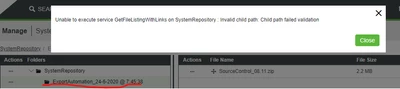
I am getting below error if I try to open that folder also.

SwapnilP_1-1593000755398.png

Best answer by PaiChung

Most likely the @ is the issue.

I'd recommend rewriting your script to create folders without special characters.

Go onto the server directly to remove this folder.


If you don't have direct server access, you can do some research into escape characters and try to delete it with an escape character at least for the @ symbol

What I'm not sure is if you need to do a URL escape %40 or force it into the jscript as a string. You may have to do it through a service though not the direct execute of the filerepository service

5 replies

PaiChung22-Sapphire IAnswer
22-Sapphire I
June 24, 2020

Most likely the @ is the issue.

I'd recommend rewriting your script to create folders without special characters.

Go onto the server directly to remove this folder.


If you don't have direct server access, you can do some research into escape characters and try to delete it with an escape character at least for the @ symbol

What I'm not sure is if you need to do a URL escape %40 or force it into the jscript as a string. You may have to do it through a service though not the direct execute of the filerepository service

SwapnilP
SwapnilP13-AquamarineAuthor
13-Aquamarine
June 24, 2020

Yes Removing @ from Foldername works.


Is there any way to rename zip file generated by ExportSourceControlledEntitiesToZipFile method ?

Currently its taking Projectname by Default and Overwrites if exported on same location. I don't want it to overwrite but create new zip if export service is run again.


Manual Export Allows scope to name the zip so there should be way.

SwapnilP_0-1593004921822.png


Swapnil
22-Sapphire I
June 24, 2020

Don't think there are options in the unzip command, so I would recommend to anticipate the overwrite and place them in differently named folders from the start.
