
10-Marble
August 2, 2023
Question

Unable to disable Vertical Scrollbar for the collection Widget in a mashup

  • August 2, 2023
  • 3 replies
  • 4289 views

When using a collection widget within a mashup, as the data used for collection widget is more so the page is getting vertical scroll bar within the collection widget area. I want to disable the vertical scrollbar and instead scroll the page. This can be seen as: 
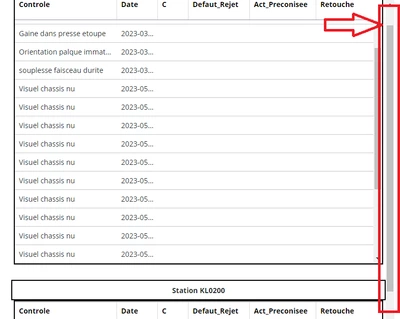
 

AA_9333878_2-1690980711841.png


In the container (where the collection widget is placed under), the "Container Scrolling -> vertical" is Disabled and can't be edited. And similarly in Container properties "EnableExpandCollapse" property seems to be un-editable, as seen in the below screenshot. 
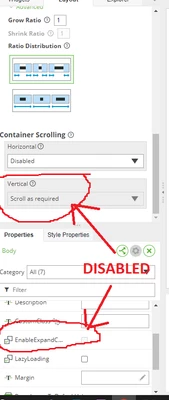
AA_9333878_1-1690980613052.png


In one of the community post, this issue was addressed / fixed in ThingWorx v9.3. However, though I'm using ThingWorx v9.3.5, I'm not able to fix this, please let me know I'm missing out anything. 


3 replies

pshashipreetham
18-Opal
18-Opal
August 17, 2023

Hi,


Container's Expand Collapse can be editable only when they are unlocked on the Explorer Tab, and I am not sure precisely what pattern it is. Try Adding the container's different sides. You will see the  ExpandCollapse editable in the Properties of the container.


Thanks,

Arjun999910-MarbleAuthor
10-Marble
August 18, 2023

@pshashipreetham - The issue is not with the "ExpandCollapse" property, but with Collection mashup. 


The data that is being passed to the Collection widget, when viewed, the data rows are more than the height of the container area. And so, the container area gets scrolled instead of the entire page. This functionality creates an issue while taking a print i.e., with container being scrolled, the print page trims the rows in the lower section. 


If we do not have container area scrolling, and instead having the page to scroll, will enable us to take a print with all the rows (in multiple pages) 

pshashipreetham
18-Opal
18-Opal
August 24, 2023

Hi @Arjun9999 ,


Understood, as of now, there is no solution to this as of now, since I am facing the same issue but with the GRID.


Thanks,

Community Manager
September 25, 2023

Hi @Arjun9999.


You can submit this as an improvement in the ThingWorx ideas forum.  That will allow others to vote for it, which will improve the possibility that it will be approved for a future release.


Regards.


--Sharon

Arjun999910-MarbleAuthor
10-Marble
October 11, 2023

"Suggest an Idea" button in the ThingWorx Ideas forum is disabled for me. Is there any limitation on the page access ? 

Please let me know. 

Community Manager
October 17, 2023

Hi @Arjun9999.


There are a few conditions that have to be met to ensure the scrolling works as expected.  Check this page from the Help Center for details.  Have you configured a fix width and height for the grid or is it responsive?


In regard to the fact that you aren't able to submit an Idea, your community membership must have been established with an account that does not have access to the PTC support site, or you don't currently have a support agreement.


Regards.


--Sharon

12-Amethyst
April 9, 2024

It's not that weird what is happening. You have a fixed size for the collection cells so it will create a scroll within.


Collection cells don't affect the container that the widget is in. Cells are positioned absolute and they "recycle" and reused as you scroll for cases where there are a lot of rows and having all that DOM in the browser would cause low performance.


It can be done, but not with OOTB. You might want to check out BMCoreUI widgets which is open source widget pack and has a more advanced Collection View widget and a TypeScript widget with which you can alter the layout of the Collection View cells. And it can't be easily done.