

1-Visitor
July 31, 2018
Solved

Unable to install Analytics Sever

  • July 31, 2018
  • 10 replies
  • 6495 views

I downloaded the Thingworx Analytics Trial from here: https://developer.thingworx.com/resources/downloads/analytics-trial-edition

My desktop runs Windows 10 Pro, and I installed Docker 17.09.0-ce as suggested in the Trial Edition Guide included in the package above.

Docker is tested with hello-world and returned an expected output. 


Then, I tried to run "AnalyticsTrialEdition-8.2.0-r3-windows-installer", but I failed when it tried to install Analytics Server. I guess it might be the reason that my Foundation is not up.

Instead running the bundle that installs the entire package at once, I installed each component one by one.


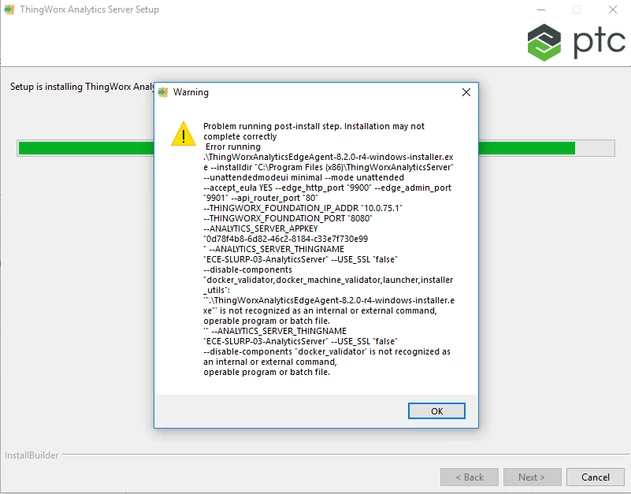
I installed "installer-twxfoundationH2-devzone-windows", and then "AnomalyDetectionServices-8.2.0-windows-installer". When I got to "ThingWorxAnalyticsServer-8.2.0-r4-windows-installer", it didn't seem be installed correctly. I have encountered following errors. And I didn't see any new Things created on my Thingworx composer.
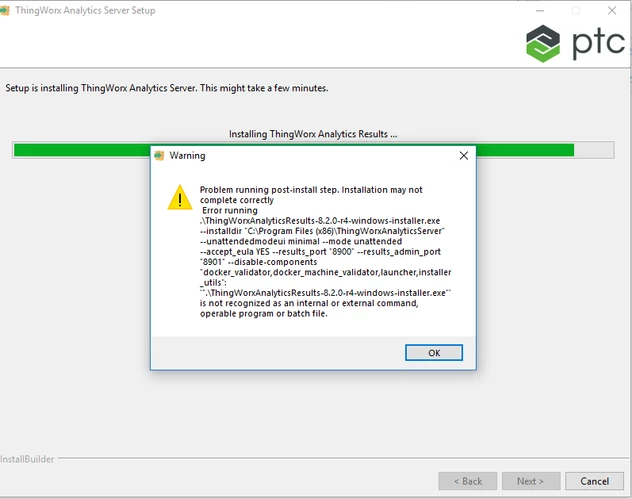
 

failureAnalytics.PNG


failureAnalytics2.PNG


I have also attached the "install_summary".

Please help me out!


Best answer by cmorfin

Hi


Thank you for this.

Here is the issue:

under C:\Users\liuq\Downloads\Thingworx-Analytics-Trial-Edition-8-2-r3 (1)\ate-windows-installer-8.2.0-r3\AnalyticsTrialEditionInstaller\component_installers\component_installers

you have got 2 files.

You should have 11 of them.

So it appears the content is not correct.


Could you double check in the original zip file downloaded how many files do you have under this AnalyticsTrialEditionInstaller\component_installers\component_installer subfolders ?

You should have 11 files, if you do, try uncompressed again the original media and make sure that the resulting folder contains the expected 11 files.

If you still have 2 files on the original media, try re downloading  it


Thanks

Kind regards

Christophe


10 replies

19-Tanzanite
August 1, 2018

Hi


You should not run the components installers individually.

Could you please uninstall everything, reboot the machine, then run the top level installer AnalyticsTrialEdition-8.2.0-r3-windows-installer.exe as Administrator.


If you get some issue with this, then upload a screenshot of the error and all the log files created under the installation directory (default C:\Program Files(x86)/ThingWorxAnalyticsTrialEdition


Thank you

Kind regards

Christophe


liuq1-VisitorAuthor
1-Visitor
August 1, 2018

Hi,

Thank you so much for your response.


I uninstalled every component and installed "AnalyticsTrialEdition-8.2.0-r3-windows-installer". It gave me an error shown in the following figure, then it aborted. I have also attached all the log files under "C:\Program Files (x86)\AnalyticsTrialEdition". 

failure1.PNG


Thanks,

Mandy

19-Tanzanite
August 1, 2018

Hi Mandy


Could you do the following:

1) open a command prompt

2) in this command prompt navigate to the folder where you have the AnalyticsTrialEdition-8.2.0-r3-windows-installer.exe that you have executed that gives the error.

3) once in this directory execute dir /S > dir.txt

4) upload the dir.txt file created


Thank you

Kind rgeards

Christophe