1-Visitor
January 4, 2016
Solved

Upload & Download File

  • January 4, 2016
  • 2 replies
  • 10166 views

Hey, guys!

I'm working on a project lately, and I need to work on a mashup that can upload and download files(.jpg .zar .mp3).

I know that there is a widget called Upload file, but there are no download widget.

How can I download a file from the Thingworx??

Best answer by sgreywilson

Lee,

If you created upload Mashup then its just a few steps to get download to work.

Your Thing I expected used the Template of FileRepository (Which we will call MyRepo)

That things has Services you can use called GetDirectoryStructure which I expect you used. You can also use GetFileListingWithLinks. Wire the services up connecting selected rows path from the GetDirectoryStructure to Parameters of the GetFileListingWithLinks. From the UI you can use the Link in the Grid to download the file.

Note: In your File upload Mashup you would of set the RepositoryName to "MyRepo" in the FileUpload Widget which connects the Services to the UI

Hop this helps
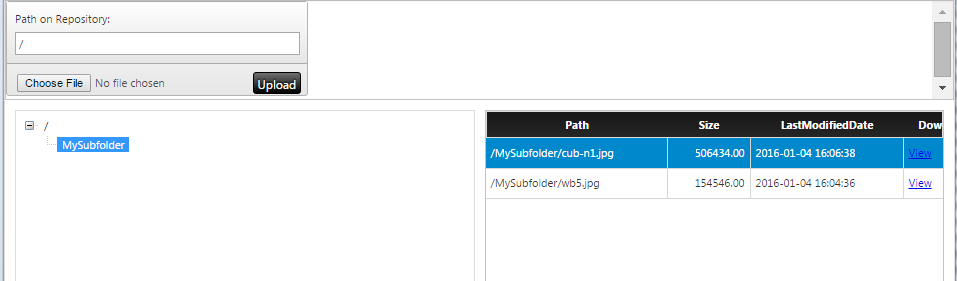
filetransfer.PNG

2 replies

16-Pearl
January 4, 2016

Lee,

If you created upload Mashup then its just a few steps to get download to work.

Your Thing I expected used the Template of FileRepository (Which we will call MyRepo)

That things has Services you can use called GetDirectoryStructure which I expect you used. You can also use GetFileListingWithLinks. Wire the services up connecting selected rows path from the GetDirectoryStructure to Parameters of the GetFileListingWithLinks. From the UI you can use the Link in the Grid to download the file.

Note: In your File upload Mashup you would of set the RepositoryName to "MyRepo" in the FileUpload Widget which connects the Services to the UI

Hop this helps

filetransfer.PNG

lwei1-VisitorAuthor
1-Visitor
January 6, 2016

Thanks a lot, it worked!!!

1-Visitor
January 6, 2016

Thanks for this helpful post!  Is there anyway to download data using this method?  I tried to export data from a value stream to my repository, but it doesn't show up in the grid to download.  All other files in my repository show up.  Thanks!

1-Visitor
January 6, 2016

I just figured it out.  You first need to use GetDirectoryStructure and feed it into a grid, then you can feed your selected row into the GetFileListingWithLinks service and in another grid your data stream or whatever you have exported will show up there and you can use the download link!  I am sure this is not a "best practice"  but if you do not have rdp access to your instance, this is a quick way to get data directly.