
1-Visitor
October 16, 2019
Question

using data filter widget in the label chart

  • October 16, 2019
  • 1 reply
  • 1880 views

Mr/Mrs, now I have a question: 

this is my code: 

var query =
{
"filters": {
"type": "And",
"filters": [
{
"type": "EQ",
"fieldName": "Department",
"value": "Milk"
},
{
"type": "EQ",
"fieldName": "Kategory",
"value": "Production Volume"
},
{
"type": "EQ",
"fieldName": "SKU",
"value": "Whipping Cream 1000 ml"
}
]
}
};
var result = Resources["InfoTableFunctions"].RenameField({
t: Resources["InfoTableFunctions"].Aggregate({
t: me.QueryDataTableEntries({ maxItems: undefined,
query: query,
values:undefined,
source: undefined,
tags:undefined
}),
columns: 'value',
aggregates: 'SUM',
groupByColumns: 'year'
}),
from: "SUM_value",
to: "value"
});
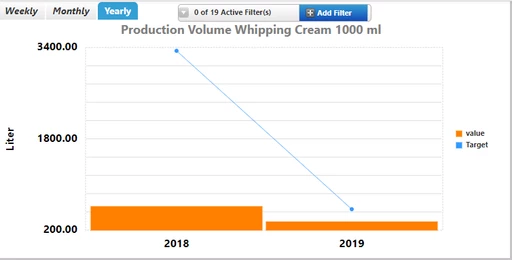
clipboard_image_0.png

after that, I need do data filter using data filter widget and only show "2019" value. How can I edit this code?

but my value and target is different services. How to figure it out?

1 reply

22-Sapphire I
October 21, 2019

You could use a second stage filtering (or two services)

either first get data based on period selection then apply filter

or vice versa.

xiaoqw1-VisitorAuthor
1-Visitor
October 22, 2019

WeChat Screenshot_20191022101341.pngHi @PaiChung,

I try to apply this query into label chart. just change ESL 1000 ml to Whipping Cream 1000 ml.


but when I bind data filter widget, it is not working. Could you help me to figure it out?

22-Sapphire I
October 22, 2019

Data filter widget if working properly will supply the query in json that you bind to the input parameter of your service

and then filter changed would trigger the service.

perhaps you can log out the query input parameter in your service to see if it is working right?