pshashipreetham
18-Opal
18-Opal
September 5, 2022
Solved

Value Display Scroll Bar - Responsive Mashup

  • September 5, 2022
  • 1 reply
  • 1192 views

Hi,

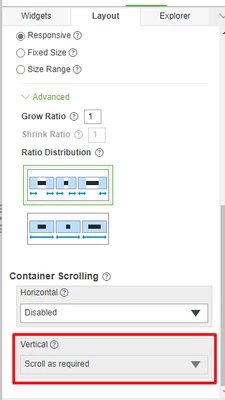
When a Value display widget is paced Responsive container, Scroll bars were seen. When checked in the Layout of the Container, Container Scrolling for Vertical is Disabled, why ?
Shashi_Preetham_0-1662381219099.png

Thanks,

Best answer by pshashipreetham

So,

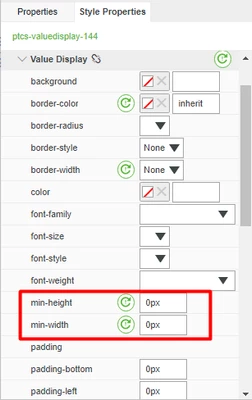
The Scroll bar issue has been Fixed. Whenever I place a Value Display widget in a Responsive Container, I need to go Style Properties--> Base ---> Value Display and Make min-height and min-width to 0px. The same must be done on the Hover, Focus, and Pressed to make Value Display total Responsive per the Screen's Resolution.

Shashi_Preetham_0-1663007267671.png

By this we can Avoid the Scroll bars in the Value Display widget and most of Responsive Widgets.

Thanks,

1 reply

pshashipreetham
18-Opal
pshashipreetham18-OpalAuthorAnswer
18-Opal
September 12, 2022

So,

The Scroll bar issue has been Fixed. Whenever I place a Value Display widget in a Responsive Container, I need to go Style Properties--> Base ---> Value Display and Make min-height and min-width to 0px. The same must be done on the Hover, Focus, and Pressed to make Value Display total Responsive per the Screen's Resolution.

Shashi_Preetham_0-1663007267671.png

By this we can Avoid the Scroll bars in the Value Display widget and most of Responsive Widgets.

Thanks,